
General
Home / Examples / Coupled Analysis / Fluid-Stress Analysis [Bernoulli/Galileo] / Example 1: Nozzle Suction Analysis
The nozzle sucks up the small disc. The initial response is analyzed.
(The initial movement of the disc just after being pulled up is solved)
The distributions of the displacement and the stress are solved.
Unless specified in the list below, the default conditions are applied.
Results will vary depending on Femtet version and the PC environment.
Item |
Setting |
Analysis Space |
3D |
Model Unit |
mm |
Item |
Settings |
Solver |
Fluid Analysis [Bernoulli] Stress Analysis [Galileo] |
Fluid Analysis Tab / Analysis Type |
Fluid Analysis: Transient Analysis |
Fluid Analysis Tab/ Laminar Flow, Turbulent Flow |
Select Turbulent Flow |
Stress Analysis Tab: Analysis Type |
Stress Analysis: Transient Analysis |
The setting on the transient analysis tab are as follows.
Tab |
Setting Item |
Setting |
||||||||||||
Transient Analysis |
Table |
|
The cylindrical air domain without a cylindrical nozzle is set with the material of air (000_Air).
A cylindrical nozzle and a disc are placed near the top and at the bottom of the air domain, respectively.
The top of the nozzle is set with the outlet boundary condition of outflow of 10 m/s.
The bottom of the air domain is set with the solid wall boundary condition.
The fixed displacement boundary condition is set on the top of the nozzle so as not to move itself in the stress analysis.

Body Number/Type |
Body Attribute Name |
Material Name |
Mesh Size |
3/Solid |
Nozzle |
001_Al * |
1.0 |
4/Solid |
Air |
000_Air * |
- |
5/Solid |
Plate |
007_Fe * |
1.0 |
* Available from the material DB
Boundary Condition Name/Topology |
Tab |
Boundary Condition Type |
Settings |
Outlet/Face |
Fluid |
Outlet |
Forced Outflow |
Wall/Face |
Fluid |
Solid Wall |
- |
Fix/Face |
Mechanical |
Displacement |
Select all UX, UY, and UZ. |
Outer Boundary Condition |
Fluid |
Inlet/Outlet |
Natural Inflow/Outflow |
Go to the [Results] tab and select [Fluid Analysis] for [Select Solver]. The flow velocity distribution at 0.1 [s] is shown below.
The vectors of the flow velocity on the section at y=0 are displayed.
The air is observed to be drawn into the nozzle.

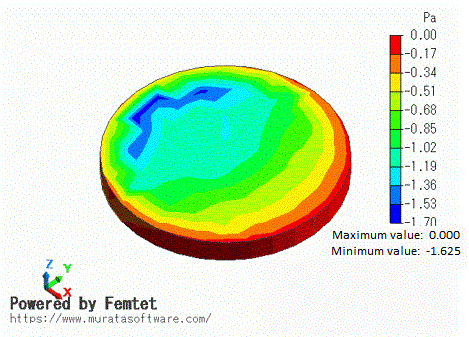
The pressure distribution on the disc is shown below.
The contours of the pressure (static) are displayed.
The lower pressure near the opening of the nozzle indicates that suction force is generated.
Go to the [Results] tab and select [Stress Analysis] for [Select Solver]. The movement of the disc is shown below.
The contours of the displacement on the section at y=0 are displayed.
The disc is observed to lift while tilting due to a pull-up force generated beneath the nozzle opening.
