Home / Examples / Electric Analysis [Coulomb] / Example 12: Periodic Boundary Condition
The basic unit of capacitors, consisting of alumina blocks and electrodes, are periodically placed in the analysis space.
By applying periodic boundary conditions, the analysis area can be minimized.
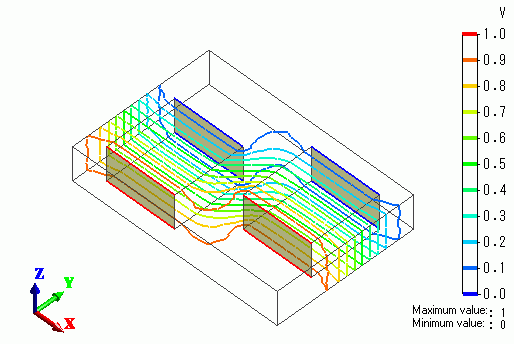
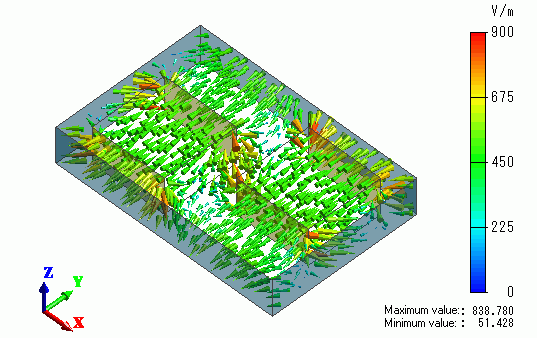
The distributions of electric field and electric potential are solved.
Unless specified in the list below, the default conditions will be applied.
Results will vary depending on Femtet version and the PC environment.
Item |
Settings |
Analysis Space |
3D |
Model Unit |
mm |
Select "Static analysis" as the electric potential is static.
Item |
Settings |
Solver |
Electric Analysis [Coulomb] |
Analysis Type |
Static Analysis (Capacitance) |
Mesh/Meshing Control |
Select Use Mesher G1 * |
Options |
N/A |
*As the default setting of Mesher G2 can not handle the periodic boundary condition for more than one pair, Mesher G1 is applied.
Disable automatic creation of the air domain.
Tab |
Setting Item |
Settings |
Mesh Tab |
Automatic Ambient Air Creation |
Create ambient air automatically: Deselect |
The base unit of the periodic structure is modeled.

Body Number/Type |
Body Attribute Name |
Material Name |
0/Solid |
Air |
000_Air(*) |
2/Solid |
Block |
001_Alumina * |
3/Solid |
Block |
001_Alumina * |
* Available from the material DB
Boundary Condition Name/Topology |
Tab |
Boundary Condition Type |
Settings |
V1/Face |
Electric |
Electric Wall |
Electric Potential Specified 1 [V] |
V2/Face |
Electric |
Electric Wall |
Electric Potential Specified 0 [V] |
Periodical1 |
Symmetry/Continuity |
|
Periodic |
Periodical2 |
Symmetry/Continuity |
|
Periodic |
Periodical3 |
Symmetry/Continuity |
|
Periodic |
Periodical4 |
Symmetry/Continuity |
|
Periodic |
On the [Model] tab,
click [Boundary Pair]  and complete the pairing as follows.
List of Pairs |
Periodical1 - Periodical2 |
Periodical3 - Periodical4 |
The vectors of the electric field are shown below.
The isoline contour of the electric potential is shown below.

The paired faces of the periodic boundary conditions have the same values,
which proves that the solution is correct.
For comparison, the potential is calculated under the magnetic wall boundary condition.
The resulting isoline contour is shown below.