General
Home / Examples / Coupled Analysis / Magnetic-Stress Analysis [Gauss, Luvens/Galileo] / Example 2: Vibration Analysis of IPM Motor
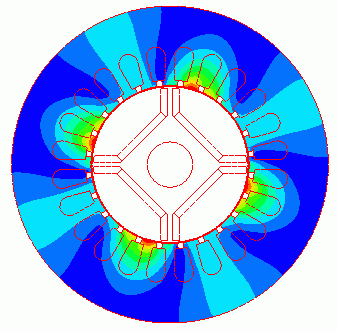
The vibration of a stator by the electromagnetic force of the IPM motor is analyzed.
Displacement, stress, torque, magnetic flux density distribution, and iron loss are solved.
The analysis is coupled with the external circuit.
The homogenizing method is applied to simulate the layer structure of the electromagnetic plates of steel for the core.
Unless specified in the list below, the default conditions are applied.
Item |
Settings |
Analysis Space |
2D |
Thickness in Depth Direction |
60 [mm] |
Unit |
mm |
Solver |
Magnetic Analysis [Luvens] |
Analysis Type |
Transient Analysis |
Analysis Options |
Select External Circuit Coupling. Select Rotating Machinery.
Select Planar Strain. [Reference type of electromagnetic force of the magnetic transient analysis results] Select Value at Each Step. |
The Rotating Machinery tab is set as follows.
Tab |
Setting Item |
Settings |
Rotating Machinery |
Rotational Move |
Select Constant Velocity Number of Rotations: 1800 [r/min] Rotor’s Initial Rotation Position: 0 [deg] |
Number of Sliding Mesh Divisions |
Circumferential Division Angle: 1.0 [deg] Rotational Quantity per Step: 1 [mesh] Number of Sliding Mesh Layers: 3 |
External circuit is as follows.
3-phase AC of 60 Hz and 5 A is applied.
The U phase is calculated with a function to [search for power phase at the maximum torque].
As [Conversion of external circuit I/O values] is ON, the resistance value of the FEM coil is set to the phase resistance which is equivalent to a full model instead of a quarter model.
See [External Circuit Conversion] and [Example of External Circuit Conversion Setup] for the details of conversion.

Set the Mesh Tab as follows.
Tab |
Setting Item |
Settings |
Mesh |
Meshing Setup |
Set the general mesh size automatically: Deselect General Mesh Size: 1 [mm] |
Automatic Ambient Air Creation |
Select Create ambient air automatically Ambient Air Scale: 1.2 |
The Transient Analysis tab is set up as follows.
The number of calculation steps is 90, circumferential division angle is 1.0 [deg], and rotational quantity per step is 1[mesh]. The rotation up to 90 degrees (=90*1.0*1) of the mechanical angle is analyzed.
It can be converted to the electric angle of 180 [deg] (mechanical angle x number of poles=90*4/2). Half period of the electric angle is analyzed.
As the input power is specified by current, the coil current is in the steady state from the beginning. The torque is also in the steady state.
To calculate the iron loss, it is necessary to set the timesteps for one period of electric angle in the steady state, and to define the iron loss characteristic for the material property.
Tab |
Setting Item |
Settings |
|||||
Transient Analysis |
Timestep |
Automatic |
|||||
Table |
|
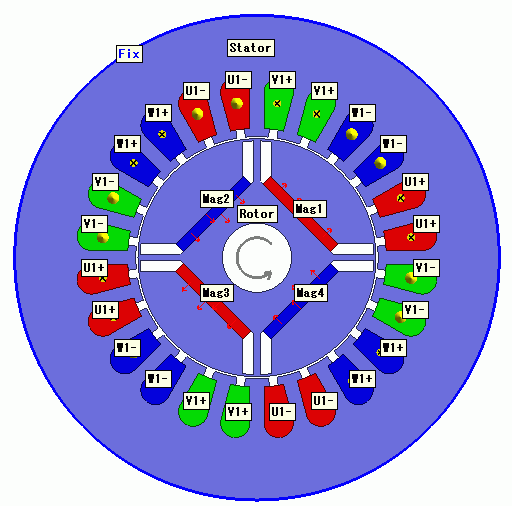
A rotor core and magnets are placed in the center. A stator and coils are placed around them.
The motor has 4 poles and 24 slots.
This is a 2D model analysis.
The stress analysis is performed on the stator domain only. The rotational displacement around the stator is fixed by the boundary condition [Fix].
Generally, if only magnetic analysis is executed, a period-symmetric model is used which utilizes the symmetry of the model as in Example 1 of magnetic transient analysis.
In this example, however, a full model is used because a periodic boundary is not supported in the stress analysis.
Body Number/Type |
Body Attribute Name |
Material Name |
14/Sheet |
Mag1 |
NMX-S43SH_Hitachi Metal* |
15/Sheet |
Mag2 |
NMX-S43SH_Hitachi Metal* |
63/Sheet |
Mag3 |
NMX-S43SH_Hitachi Metal* |
62/Sheet |
Mag4 |
NMX-S43SH_Hitachi Metal* |
66/Sheet |
Rotor |
35JN270_JFE Steel* |
65/Sheet |
Stator |
35JN270_JFE Steel* |
37/Sheet |
U1+ |
008_Cu * |
38/Sheet |
U1+ |
008_Cu * |
39/Sheet |
W1- |
008_Cu * |
40/Sheet |
W1- |
008_Cu * |
41/Sheet |
V1+ |
008_Cu * |
42/Sheet |
V1+ |
008_Cu * |
43/Sheet |
U1- |
008_Cu * |
44/Sheet |
U1- |
008_Cu * |
45/Sheet |
W1+ |
008_Cu * |
46/Sheet |
W1+ |
008_Cu * |
47/Sheet |
V1- |
008_Cu * |
48/Sheet |
V1- |
008_Cu * |
* Available from the material DB
The body attribute is set up as follows.
For the core, the homogenizing method is selected to simulate the layered steel plates.
Body Attribute Name |
Tab |
Settings |
Mag1 |
Direction |
Vector: X=1, Y=0, Z=1 |
Current |
Click Yes for induced current setting. |
|
Stator/Rotor/Air |
Rotor |
|
Analysis Domain |
Deselect Stress Analysis. |
|
Mag2 |
Direction |
Vector: X=1, Y=0, Z=-1 |
Current |
Click Yes for induced current setting. |
|
Stator/Rotor/Air |
Rotor |
|
Analysis Domain |
Deselect Stress Analysis. |
|
Mag3 |
Direction |
Vector: X=-1, Y=0, Z=-1 |
Current |
Click Yes for induced current setting. |
|
Stator/Rotor/Air |
Rotor |
|
Analysis Domain |
Deselect Stress Analysis. |
|
Mag4 |
Direction |
Vector: X=-1, Y=0, Z=1 |
Current |
Click Yes for induced current setting. |
|
Stator/Rotor/Air |
Rotor |
|
Analysis Domain |
Deselect Stress Analysis. |
|
Rotor |
Layer |
Select Take into account layer Space Factor: 97 [%] Layer Vector: X=0, Y=1, Z=0 |
Stator/Rotor/Air |
Rotor |
|
Analysis Domain |
Deselect Stress Analysis. |
|
Stator |
Layer |
Select Take into account layer Space Factor: 97 [%] Layer Vector: X=0, Y=1, Z=0 |
Stator/Rotor/Air |
Stator |
|
U1+ |
Current |
Waveform: External circuit coupling Coil Name on the Circuit: U1 Turns: 35 [Turns] Direction: +Y Direction |
Stator/Rotor/Air |
Stator |
|
V1+ |
Current |
Waveform: External Circuit Coupling Coil Name on the Circuit: V1 Turns: 35 [Turns] Direction: +Y Direction |
Stator/Rotor/Air |
Stator |
|
W1- |
Current |
Waveform: External Circuit Coupling Coil Name on the Circuit: W1 Turns: 35 [Turns] Direction: - Y Direction |
Stator/Rotor/Air |
Stator |
|
U1- |
Current |
Waveform: External Circuit Coupling Coil name on the circuit: U1 Turns: 35[Turns] Direction: - Y Direction |
Stator/Rotor/Air |
Stator |
|
V1- |
Current |
Waveform: External Circuit Coupling Coil name on the circuit: V1 Turns: 35 [Turns] Direction: - Y Direction |
Stator/Rotor/Air |
Stator |
|
W1+ |
Current |
Waveform: External Circuit Coupling Coil name on the circuit: W1 Turns: 35 [Turns] Direction: +Y direction |
Stator/Rotor/Air |
Stator |
Set the boundary condition to fix the rotational displacement surrounding the stator.
Boundary Condition Name/Topology |
Tab |
Boundary Condition Type |
Settings |
Fix |
Mechanical |
Rotational Displacement |
Coordinates on the Axis: 0.0, 0.0, 0.0 Rotation Angle: 0 [deg] |
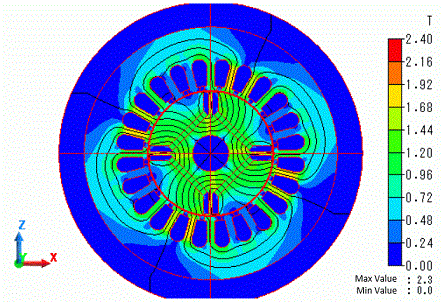
Below is a result of the magnetic analysis.
The distribution of the magnetic flux density and magnetic flux lines at the rotation angle of 0 [deg] are shown below.
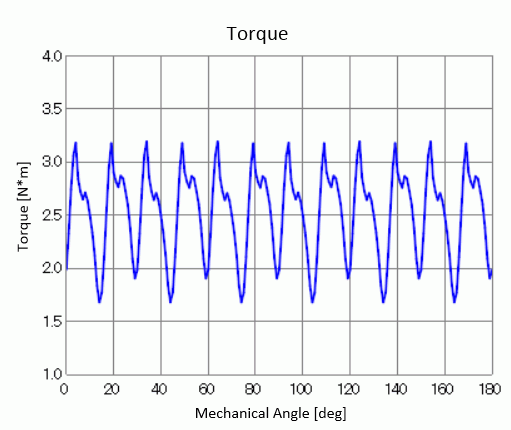
The wave of torque is shown as follows. It is output to [Torque [N*m]] of the result table.
The torque is in the steady state from 0 [deg] as the current source is used.
Next is a result of the stress analysis.
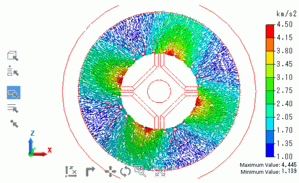
The acceleration at the rotation angle of 10[deg] is shown below.
The vibration of the stator can be observed.