General
Home / Examples / Coupled Analysis / Magnetic-Thermal Analysis [Gauss/Watt] / Example 1: Heating Caused by Applied Current
This is an example of the magnetic-thermal coupled analysis.
The joule loss due to the applied current and the resulting heating are solved.
The vectors of the magnetic field and the temperature distribution by the heating are viewed.
Unless specified in the list below, the default conditions will be applied.
Results will vary depending on Femtet version and the PC environment.
Item |
Settings |
Analysis Space |
3D |
Model Unit |
mm |
Item |
Settings |
Solver |
Magnetic Analysis [Gauss] Thermal Analysis [Watt] |
Analysis Type |
Magnetic Analysis: Static Analysis Thermal Analysis: Steady-state Analysis |
Options |
N/A |
The Thermal Load tab is set as follows.
Tab |
Setting Item |
Settings |
Thermal Load |
Reference Temperature |
25 [deg] |
Set the Mesh Tab as follows.
Tab |
Setting Item |
Settings |
Mesh |
Meshing Setup |
Automatically set the general mesh size: Deselect General Mesh Size: 2 [mm] |
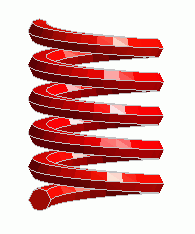
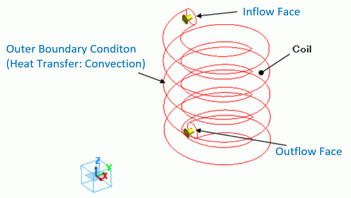
A helical solid body Coil (coil) is defined.
[Create ambient air automatically] is selected by default.
The automatically created ambient air is analyzed only in the magnetic analysis, not in the thermal analysis.
Finer meshes are set on the area where the magnetic field changes drastically.
Body Number/Type |
Body Attribute Name |
Material Name |
Mesh Size |
0/Solid |
Coil |
008_Cu * |
3 |
* Available from the material DB
Body attribute is set up as follows to apply current to the coil.
Body Attribute Name |
Tab |
Settings |
Coil |
Current |
Current: 100 [A] Turns: 1 [Turns] |
"Natural convection (automatic coefficient calculation)" is set for the outer boundary condition (in the thermal analysis, the outer boundary condition is surrounding the coil).
Boundary Condition Name/Topology |
Tab |
Boundary Condition Type |
Settings |
Outer Boundary Condition * |
Thermal |
Heat Transfer: Convection |
Natural Convection (Automatic Coefficient Calculation) Ambient Temperature: 25 [deg] |
To set Outer Boundary Condition, go to the [Model] tab
and click [Outer Boundary Condition]  .
.
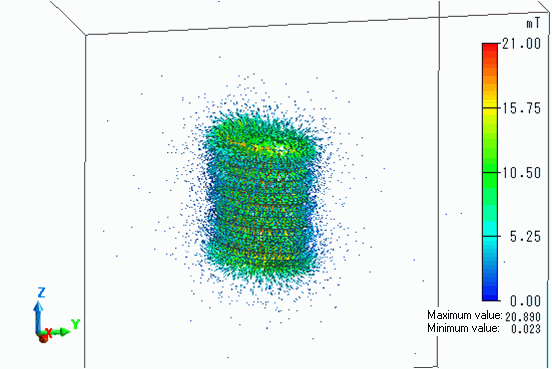
The vectors of the magnetic field are shown below.
The vectors of the current density are shown below.
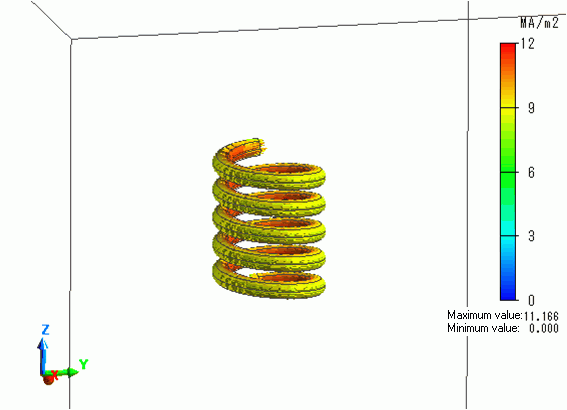
The current is flowing as set for the coil.
The temperature contour as a result of Watt is shown below.
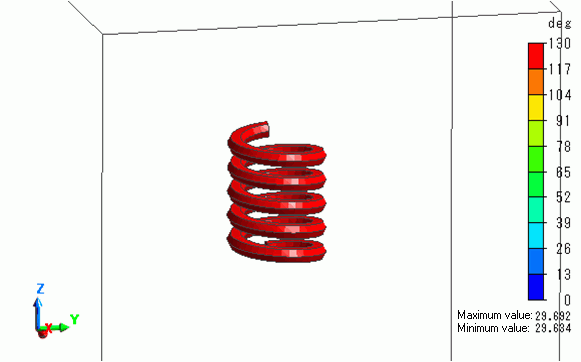
The coil temperature goes up as high as about 130 [deg].