General
Home / Examples / Electromagnetic Analysis [Hertz] / Example 6: Patch Antenna
The characteristics of a patch antenna are analyzed.
The return loss characteristics (S11) at the feeding port are solved.
Unless specified in the list below, the default conditions will be applied.
The output of field data is switched off.
That reduces the size of results file.
[How to Reduce the Calculation Time]
Item |
Settings |
Analysis Space |
3D |
Model Unit |
mm |
Item |
Settings |
Solver |
Electromagnetic Analysis [Hertz] |
Analysis Type |
Harmonic Analysis |
Options |
Field Data to Save: Don't save * |
(*) In this session, we are interested in the return loss characteristics only and the field data is not needed. Therefore, Don't save is selected.
That reduces the size of results file.
Harmonic Analysis tab and Open Boundary tab are set as follows.
Tab |
Setting Item |
Settings |
Mesh |
Element Type |
2nd-order Element |
Multigrid/Adaptive Mesh Method |
Select [Apply adaptive meshing]. |
|
Frequency-Dependent Meshing |
Reference Frequency: 10x109 [Hz] Select [The conductor bodies thicker than the skin depth constitute the boundary condition].
There are no conductive solid bodies in this analysis model. Therefore the setting above is irrelevant. |
|
Harmonic analysis |
Sweep Type |
Select [Linear Step by Division Number] |
Sweep Setting |
Minimum: 1×10⁹ [Hz] Maximum: 10x109 [Hz] Division: 200 |
|
Frequency Sweep |
Select Fast Sweep S-parameter Tolerance: 1x10⁻³ |
|
Input |
1.0 [W] |
|
Open Boundary |
Type |
Absorbing Boundary |
Order of Absorbing Boundary |
1st-order |
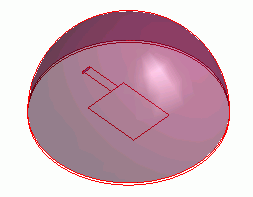
Antenna pattern (Metal) is created on a circular substrate (sub).
It is covered with the hemispherical air (AIR). The open boundary (OPEN) is set to the hemisphere.
The imprinting body is set to the feeding point, where the port boundary condition is set. The bottom face of the substrate (sub) is set with the electric wall boundary condition.
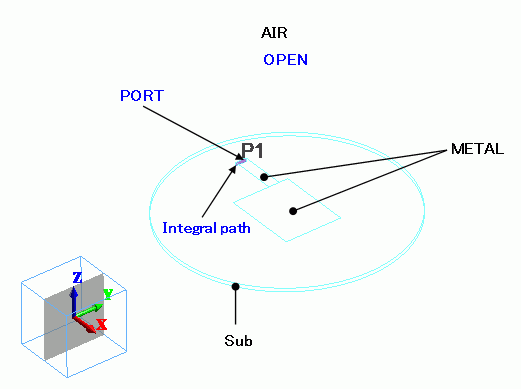
You may give the thickness to METAL in the body attribute. That does not affect the simulation.
(Related information: Analysis Condition, Electromagnetic Analysis tab, and [Take into account thickness of face/edge electrode])
Body Number/Type |
Body Attribute Name |
Material Name |
0/Solid |
AIR |
000_Air * |
1/Sheet |
METAL |
003_Ag * |
2/Solid |
sub |
006_Glass_epoxy * |
3/Sheet |
METAL |
003_Ag * |
4/Sheet |
Imprinting body |
|
(*) Available from the material DB
The bottom face and side of the substrate (sub) are set with [Electric Wall] of the outer boundary condition, forming a ground electrode.
Boundary Condition Name/Topology |
Tab |
Boundary Condition Type |
Setting |
PORT/Face |
Electric |
Port |
Integral Path: Set Path1 Reference Inpedance: Select Specify, 50 Ω
Number of Precalculated Modes: 5 Number of Modes Used in the Actual 3D Analysis: Automatic Select Modes: None |
OPEN/Face |
Electric |
Open Boundary |
Select on the open boundary tab of the analysis condition setting. |
Outer Boundary Condition |
Electric |
Electric wall |
|
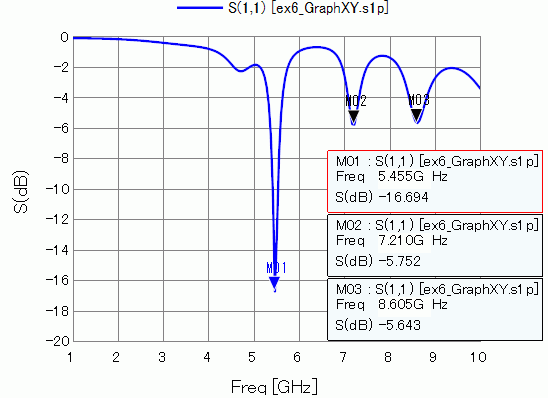
S-parameter S11 at the feeding point is shown below.
It is matched at about 5.6 GHz.
How to Display
On the [Results] tab  , click ▼ at the side of [Show Characteristics Chart]
 . Click [S/Y Parameters] on the submenu.
The radiation pattern and efficiency of the antenna at 5.59 [GHz] are shown below.

How to Display
On the [Results] tab , click ▼ at the side of [Show Characteristics Chart]. Click [Directivity Graph] on the submenu.
See [[Simple Mode] Electromagnetic Waves Directivity] for more information.