
Home / Examples / Electromagnetic Analysis [Hertz] / Example 19: Differential Lines with Connector
The differential-mode and common-mode S-parameters are solved for differential lines with connectors.
How to Reduce the Calculation Time
Item |
Settings |
Analysis Space |
3D |
Model Unit |
mm |
Item |
Settings |
Solver |
Electromagnetic Analysis [Hertz] |
Analysis Type |
Harmonic Analysis |
Mesh tab, Harmonic analysis tab and Open Boundary tab are set as follows.
Tab |
Setting Item |
Settings |
Mesh Tab |
Element Type |
2nd-order Element |
Multigrid/Adaptive Mesh Method |
Select [Apply adaptive meshing]. |
|
Frequency-Dependent Meshing |
Reference Frequency: 1x10⁹ [Hz] Select [The conductor bodies thicker than the skin depth constitute the boundary condition]. |
|
Harmonic Analysis |
Sweep Type |
Select [Linear Step by Division Number] |
Sweep Setting |
Minimum: 1x10⁸ [Hz] Maximum: 1.5x10⁹ [Hz] Division: 10 |
|
Sweep Setting |
Select Discrete Sweep |
|
Input |
1.0 [W] |
|
Open boundary |
Type |
Absorbing boundary |
Order of Absorbing Boundary |
1st-order |
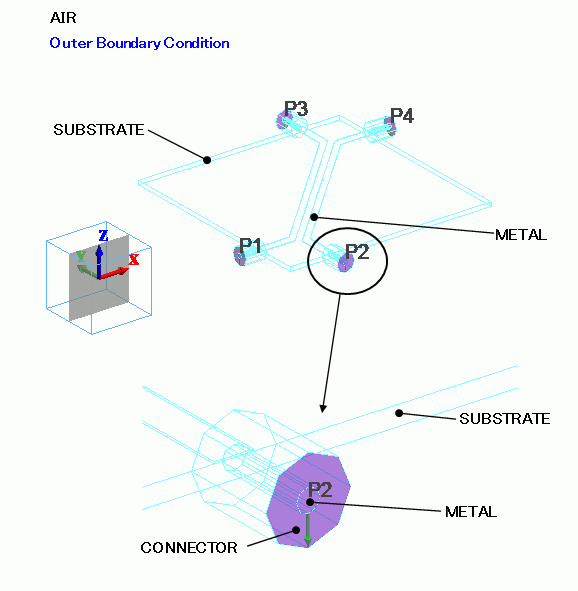
Two microstrip lines are placed in parallel. They are connected to co-axial connectors.
The connectors are octagonal cylinders. Their end faces are set with the [I/O port] boundary condition.
The integral path is bridging the inner conductor and the outer perimeter.
Electric wall surrounds the model.
Body Number/Type |
Body Attribute Name |
Material Name |
1/Solid |
CONNECTOR |
Resin |
4/Solid |
CONNECTOR |
Resin |
5/Solid |
CONNECTOR |
Resin |
7/Solid |
CONNECTOR |
Resin |
15/Solid |
AIR |
000_Air(*) |
22/Solid |
METAL |
003_Ag * |
23/Solid |
METAL |
003_Ag * |
25/Solid |
METAL |
003_Ag * |
26/Solid |
METAL |
003_Ag * |
27/Solid |
METAL |
003_Ag * |
28/Solid |
METAL |
003_Ag * |
29/Solid |
SUBSTRATE |
006_Glass_epoxy * |
* Available from the material DB
Resin's property is as follows.
Material Name |
Permittivity |
Resin |
2.3 |
Boundary Condition Name/Topology |
Tab |
Boundary Condition Type |
Settings |
AUTO_PORT_1/Face |
Electric |
Port |
50 [Ω] |
AUTO_PORT_2/Face |
Electric |
Port |
50[Ω] |
AUTO_PORT_3/Face |
Electric |
Port |
50[Ω] |
AUTO_PORT_4/Face |
Electric |
Port |
50 [Ω] |
Outer Boundary Condition |
Electric |
Electric Wall |
|
On the [Results] tab

click [Show Characteristics Chart]  and select SYZ Matrix.
On the SYZ matrix dialog box menu, click [Edit] and [Port Order Exchange/Balance Conversion].
Select PORT1 and PORT2, and click the [Pair up] button.
Select PORT3 and PORT4, and click the [Pair up] button.
You will see PORT(1,2)DIF, PORT(1,2)COM, PORT(3,4)DIF, PORT(3,4)COM in this order. You may change the listing order. For example,
select PORT(1,2)COM and PORT(3,4)DIF and press the [Exchange] button.
The S matrix will be listed as in the table below.
Tabel 1. S Matrix Listing Order and Abbreviation
Port Number |
Before Conversion |
After Conversion |
||
Title in Edit Dialog |
Title in Edit Dialog |
Note |
Abbreviatied Title |
|
1 |
AUTO_PORT_001:m1 |
DIFF(AUTO_PORT_001:m1,AUTO_PORT_002:m1) |
Differential mode of AUTO_PORT_001 and AUTO_PORT_002 |
1d |
2 |
AUTO_PORT_002:m1 |
DIFF(AUTO_PORT_003:m1,AUTO_PORT_004:m1) |
Differential mode of AUTO_PORT_003 and AUTO_PORT_004 |
2d |
3 |
AUTO_PORT_003:m1 |
COM(AUTO_PORT_001:m1,AUTO_PORT_002:m1) |
Common (same phase) mode of AUTO_PORT_001 and AUTO_PORT_002 |
1c |
4 |
AUTO_PORT_004:m1 |
COM(AUTO_PORT_003:m1,AUTO_PORT_004:m1) |
Common (same phase) mode of AUTO_PORT_003 and AUTO_PORT_004 |
2c |
In the SYZ Matrix dialog box, select [1 1], [1 2], [1 3] and [1 4] in the matrix element,
and click the [XY Graph]button. The frequency plots below of S parameters will appear.
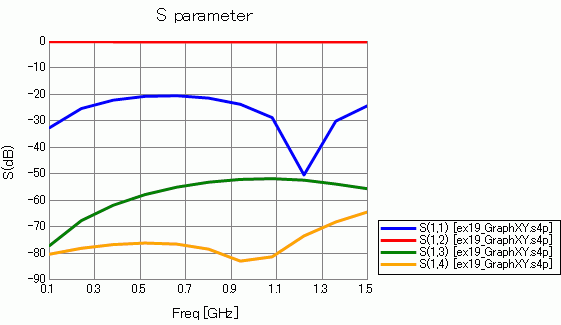
See the table below for the S(x,x) notation.
Table 2. S Matrix Lookup Table
Title in Graph |
With Abbreviated Title |
S(1,1) |
S(1d,1d) |
S(1,2) |
S(1d,2d) |
S(1,3) |
S(1d,1c) |
S(1,4) |
S(1d,2c) |
1d,2d,1c and 2c are the abbreviated titles.