General
Home / Examples / Electromagnetic Analysis [Hertz] / Example 23: Mixed-Mode S-Parameters Analysis of Differential Lines
The characteristics of differential lines are analyzed.
The mixed-mode S-parameters are solved.
Unless specified in the list below, the default conditions will be applied.
Results will vary depending on Femtet version and the PC environment.
Item |
Settings |
Analysis Space |
3D |
Model Unit |
mm |
Item |
Settings |
Solver |
Electromagnetic Analysis [Hertz] |
Analysis Type |
Harmonic Analysis |
Options for Electromagnetic Analysis |
Select Propagation mode transformation. |
Mesh tab, Harmonic Analysis tab, and Open Boundary tab are set as follows.
Tab |
Setting Item |
Settings |
Mesh |
Frequency-Dependent Meshing |
Reference Frequency: 1x10¹⁰ [Hz] Select [The conductor bodies thicker than the skin depth constitute the boundary condition]. |
Harmonic Analysis |
Sweep Type |
Select [Linear Step by Division Number] |
Sweep Setting |
Minimum: 0.1×10⁹ [Hz] Maximum: 5x10⁹ [Hz] Division: 10 |
|
Sweep Setting |
Select Discrete Sweep |
|
Input |
1.0 [W] |
|
Open Boundary |
Type |
Absorbing Boundary |
Order of Absorbing Boundary |
1st-order |
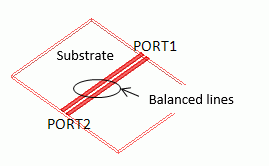
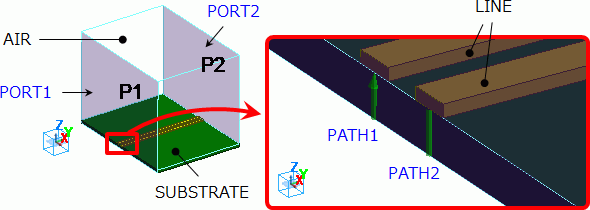
Two electrodes are created on a substrate. They function as differential lines.
They are covered with rectangle air space.
Air and ports at both ends of the substrate are set as in the diagram below.
Set two integral paths (PATH1 and PATH2) connecting two electrodes and the bottom of the substrate.
The bottom of the substrate contacts the electric wall outer boundary condition.
Body Number/Type |
Body Attribute Name |
Material Name |
0/Solid |
SUBSTRATE |
006_Glass_epoxy * |
1/Solid |
AIR |
000_Air(*) |
2/Solid |
LINE |
003_Ag * |
3/Solid |
LINE |
003_Ag * |
5/Sheet |
Imprinting body |
|
6/Sheet |
Imprinting body |
|
(*) Available from the Material DB
Boundary Condition Name/Topology |
Tab |
Boundary Condition Type |
Settings |
Port_001/Face |
Electric |
Port |
Integral Path:
Reference Impedance:
Number of Modes
|
Port_002/Face |
Electric |
Port |
Same as Above. |
Outer Boundary Condition |
Electric |
Electric Wall |
|
*1) Click [Differential Pair] button while selecting PATH1 and PATH2.
The integral path in the same differential pair will be given the same number like "1" following the integral path name.
*2) Differential Impedance can be selected if the differential pair is set.
Select Port for [Solver] on the [Results] tab. From [Mode], select 5 GHz which is the maximum analysis frequency.
As the number of modes to precalculate is set to 5,
five propagation modes are calculated for each frequency.
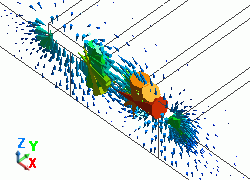
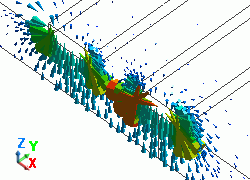
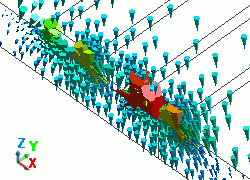
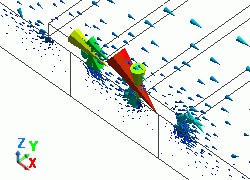
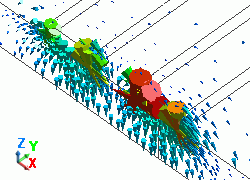
The diagram below shows the electric fields of five propagation modes calculated for PORT1 at 5 GHz.
A part of the Propagation constant dialog box is also shown at the bottom of each picture in the diagram below.
Propagation Constant dialog box can be opened from Mode Information of the [Chart] button.
Mode |
Differential Mode Analysis |
50: 5.000000e+09Hz: (0) |
PORT1 p1m1 |
51: 5.000000e+09Hz: (1) |
PORT1 p1m2 |
52: 5.000000e+09Hz: (2) |
PORT1 Not used |
53: 5.000000e+09Hz: (3) |
PORT1 Not used |
54: 5.000000e+09Hz: (4) |
PORT1 Not used |
You can tell that the differential mode is calculated first, and then the common mode is calculated at PORT1.
The third or higher mode is not used in the 3D analysis as the Propagation Constant dialog box shows [Not used].
Please confirm that the differential and common modes are used in the 3D analysis also at PORT2.
Click [SYZ Matrix] of the [Chart] button. SYZ Matrix dialog box will show up.
Select your desired element and click the [XY Graph] button.
The graph of mixed-mode S-parameters will appear as shown below.
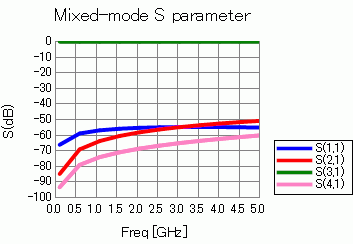
As shown in the Port Index of the SYZ Matrix dialog box,
the suffixes of S-parameters indicate the ports as follows.
Number |
Port: Mode |
1 |
PORT1:DIFF(PATH1,PATH2) |
2 |
PORT1:COM(PATH1,PATH2) |
3 |
PORT2:DIFF(PATH1,PATH2) |
4 |
PORT2:COM(PATH1,PATH2) |
[DIFF] means differential mode and [COM] means common mode.