General
Home / Examples / Electromagnetic Analysis [Hertz] / Example 37: Electromagnetic Field Correction
The electromagnetic field of a minute dipole antenna is corrected by the function of [Correct errors of the electromagnetic field originated in the open boundary]
Unless specified in the list below, the default conditions will be applied.
Results will vary depending on Femtet version and the PC environment.
Item |
Settings |
Solver |
Electromagnetic Analysis [Hertz] |
Analysis Space |
3D |
Analysis Type |
Harmonic Analysis |
Unit |
mm |
Options |
Select Correct errors of the electromagnetic field originated in the open boundary |
Harmonic Analysis tab and Open Boundary tab are set as follows.
Tab |
Setting Item |
Settings |
Harmonic Analysis |
Sweep Type |
Single Frequency |
Frequency |
3×10⁶ [Hz] |
|
Sweep Setting |
Select Discrete Sweep |
|
Input |
1.0 [W] |
|
Open Boundary |
Type |
Absorbing Boundary |
Order of Absorbing Boundary |
1st-order |
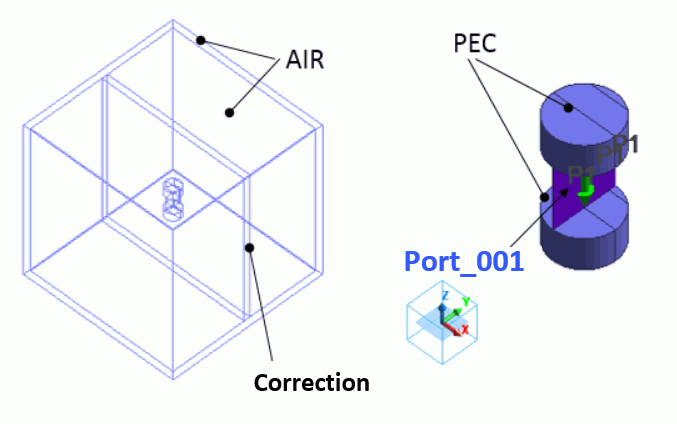
A minute dipole antenna consists of a perfect electric conductor ('PEC') and port, surrounded by ambient air. The 'correction' body serves as a domain for correcting electromagnetic fields, specifically set to minimize calculation time.
The air domain is surrounded by another air domain. The open boundary condition is set to the outer-most area of the analysis domain. The accuracy of the electromagnetic field near the open boundary condition is deteriorated. Therefore, for the better look, another air box is created to hide the area with low accuracy.
Whole model Antenna
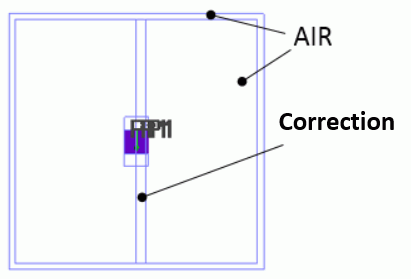
Model viewed from X axis direction
Body Number/Type |
Body Attribute Name |
Material Name |
45,46,69,71,75,76/Solid |
PEC |
PEC |
78,79,81/Sheet |
AIR |
AIR |
80/Solid |
Correction |
AIR |
47,70,77/Sheet |
Imprinting body |
|
* Available from the material DB
Body Number/Type |
Body Attribute Name |
Material Name |
Mesh Size |
45,46,69,71,75,76/Solid |
PEC |
PEC |
0.5 |
47,70,77/Sheet |
Imprinting body |
0.5 |
Body Attribute Name |
Analysis Domain |
Correction |
Select [Correct errors of the electromagnetic field originated in the open boundary] |
Correction is executed only for the bodies with this option selected.
Boundary Condition Name/Topology |
Tab |
Boundary Condition Type |
Settings |
PORT/Face |
Electric |
Port |
Current port |
Outer Boundary Condition |
Electric |
Open Boundary |
Select on the open boundary tab of the analysis condition setting. |
Setting Item |
Setting |
Frequency-Dependent Meshing |
Reference Frequency: 300x106 [Hz] Select [The conductor bodies thicker than the skin depth constitute the boundary condition]. |
You can view the results fields (such as Results tab > Field).
Go to Results tab > Display > Solver, and select [Electromagnetic waves correction field].
The field types are as follows.
| Electric Field [V/m] Original | Electric field before correction. It is in the same state of electric field as when the electromagnetic solver is selected. Depending on the display method, they don't necessarily match. |
| Electric Field [V/m] Data for Correction | It is the electric field for correction. The larger the value, the greater the reflection on the open boundary. |
| Electric Field [V/m] Data after Correction | The sum of "Electric Field Original" and "Electric Field Data for Correction". |
| Magnetic Field [A/m] Original | It is the magnetic field before correction. It is in the same state of magnetic field as when the electromagnetic solver is selected. Depending on the display method, they don't necessarily match. |
| Magnetic Field [A/m] Data for Correction | It is the magnetic field for correction. The larger the value, the greater the reflection on the open boundary. |
| Magnetic Field [A/m] after Correction | The sum of "Magnetic Field Original" and "Magnetic Field Data for Correction". |
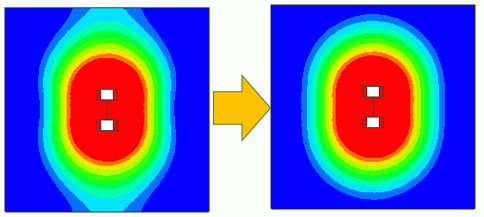
The left figure below shows the results with the following conditions. The gradation contour diagram is displayed with bodies "AIR" and "PEC" hidden because the corrected body in this example is body "Correction" only.
| Electromagnetic waves correction field | 0.300000 GHz |
| Electric field [V/m] original | Magnitude |
| 270° | Log |
The right figure below is obtained by changing "Electric field [V/m] original" to "Electric field [V/m] after correction".
The color scale is set from 3x10⁵ [V/m] to 3x10⁴ [V/m]. This setting makes the overall distribution easy to view.
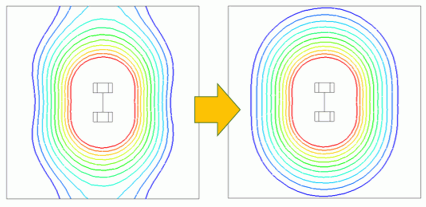
While the lower left diagram shows the field pulled to the boundary unnaturally in the upper and lower areas of the dipole antenna, the lower right diagram shows the natural field after the correction. The influence of the boundary is not observed.
The correction has been successfully executed.
Please note that the diagrams at the top of this page are drawn with the cross sectional view and the line contour.