Home / Examples / Acoustic Analysis [Mach] / Example 8: View by the Directivity Calculation Method
View the analysis results using the directivity calculation method.
Unless specified in the list below, the default conditions will be applied.
Results will vary depending on Femtet version and the PC environment.
In the acoustic analysis or piezoelectric-acoustic coupled analysis, analysis results using the directivity calculation method can be viewed. Transient analysis is not supported.
Item |
Settings |
Analysis Space |
3D |
Model Unit |
mm |
Item |
Settings |
Solver |
Acoustic Analysis [Mach] |
Analysis Type |
Harmonic Analysis |
Options |
N/A |
Tab |
Setting Item |
Settings |
Harmonic Analysis |
Frequency |
Minimum: 5 [kHz] Maximum: 5 [kHz] |
Mesh |
General Mesh Size |
13 [mm] * |
* Wave length at 5 [kHz] is 66 [mm]. The mesh size is based on one-fifth of the wavelength. 13 [mm] is given.
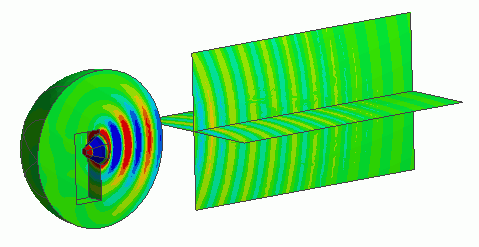
The model is to observe how the speaker's sound travels for 1-meter distance in the air.
An area is extracted from the spherical ambient air for a speaker's domain. Therefore, a body of speaker does not exist. The driving source is set at the pressure of 1 [Pa]. For easy viewing of the inside of the model, the open boundary condition is hidden. The directivity domain consists of two sheet bodies.

Body Number/Type |
Body Attribute Name |
Material Name |
2/Solid |
Air |
000_Air(*) |
5/Solid |
Air |
000_Air(*) |
6/Solid |
Air |
000_Air(*) |
9/Sheet |
OUTSIDE |
000_Air(*) |
10/Sheet |
OUTSIDE |
000_Air(*) |
* Available from the material DB
Body Attribute Name |
Analysis Domain |
OUTSIDE |
Select [Use directivity calculation method] |
If [Use directivity calculation method]is selected, the body will be recognized as the domain for the directivity calculation. The material [000_Air] is specified for this body but not used for the calculation. The simulation is performed assuming that the body material set with open boundary conditions exists outside of the boundary.
Boundary Condition Name/Topology |
Tab |
Boundary Condition Type |
Settings |
F/Face |
Acoustic |
Pressure |
1 [Pa] |
Open/Face |
Acoustic |
Open Boundary |
|
The sound pressure distribution in the wide space can be observed by using the directivity domain.