Home / Examples / Acoustic Analysis [Mach] / Example 4: Hemispherical Speaker
A hemispherical speaker is analyzed.
The distribution of sound pressure in the air is solved.
Unless specified in the list below, the default conditions will be applied.
Results will vary depending on Femtet version and the PC environment.
Item |
Settings |
Analysis Space |
3D |
Model Unit |
mm |
Item |
Settings |
Solver |
Acoustic Analysis [Mach] |
Analysis Type |
Harmonic Analysis |
Options |
N/A |
The harmonic analysis tab is set up as follows.
The sound waves propagate outside the analysis region. Therefore the [open boundary] condition below is applied initially.
The default conditions are applied.
Tab |
Setting Item |
Settings |
Harmonic analysis
|
Frequency |
Minimum: 1000 [Hz] Maximum: 1000 [Hz] |
Sweep Type |
Select [Log Step] |
|
Sweep Setting |
Select [Fast Sweep]. Tolerance: 1.0x10⁻² |
|
Open Boundary Tab |
Type |
Absorbing Boundary |
Order of Absorbing Boundary |
1st-order |
|
Coordinates of Origin |
x = y = z = 0 |
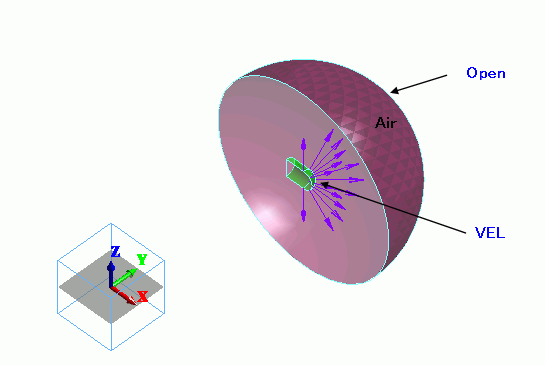
The air hemisphere is created from a solid body. The open boundary is set on the surface of the hemisphere.
A circular sheet body is defined for imprinting.
The velocity boundary condition is applied.
Body Number/Type |
Body Attribute Name |
Material Name |
0/Solid |
Air |
000_Air(*) |
* Available from the material DB
The sound speed of air is set as follows.
Material Name |
Tab |
Settings |
000_Air(*) |
Sound Speed |
3.4X10² [m/s] |
The [speed] boundary condition is set on the face of the imprinting body.
Boundary Condition Name/Topology |
Tab |
Boundary Condition Type |
Settings |
Open/Face |
Acoustic |
Open Boundary |
|
VEL/Face |
Acoustic |
Speed |
1 [m/s] |
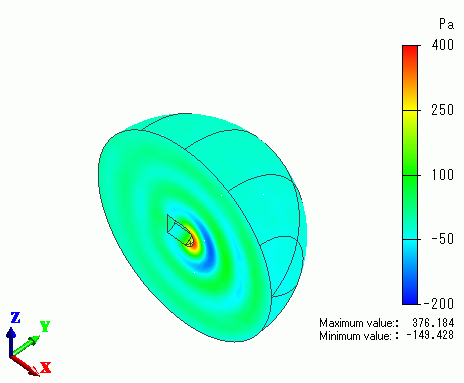
The gradation contour of the sound pressure at the driving frequency of 100 [Hz] is shown below.