Home / Examples / Acoustic Analysis [Mach] / Example 7: Acoustic Impedance
Acoustic impedance boundary condition is used to create a non-reflecting boundary.
Unless specified in the list below, the default conditions will be applied.
Results will vary depending on Femtet version and the PC environment.
Item |
Settings |
Analysis Space |
3D |
Model Unit |
mm |
Item |
Settings |
Solver |
Acoustic Analysis [Mach] |
Analysis Type |
Static Analysis |
Options |
N/A |
Tab |
Setting Item |
Settings |
Harmonic Analysis |
Frequency |
Minimum: 50 [kHz] Maximum: 50 [kHz] |
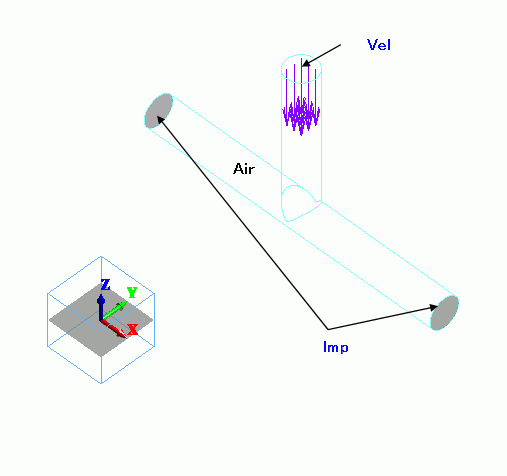
A vertical pipe is jointed on a horizontal pipe. Sound waves go in the vertical pipe and exit through the horizontal pipe.
The acoustic impedance boundary is set on the sections of the horizontal pipe.
That makes the horizontal pipe reflection-free.
Body Number/Type |
Body Attribute Name |
Material Name |
0/Solid |
AIR |
000_Air(*) |
* Available from the material DB
Boundary Condition Name/Topology |
Tab |
Boundary Condition Type |
Settings |
Vel/Face |
Acoustic |
Speed |
1 [m/s] |
Imp/Face |
Acoustic |
Acoustic Impedance |
409.7 [Pa*s/m] (*) |
(*) Set the specific acoustic impedance of air.
The isosurface contour of the sound pressure is shown below.
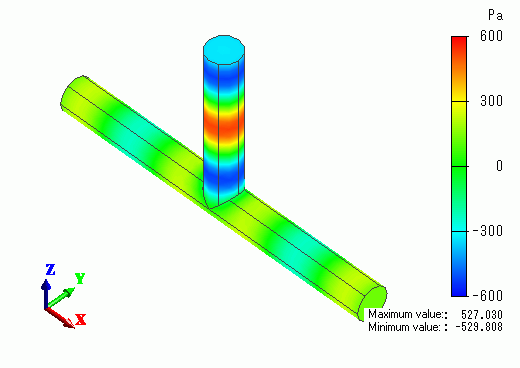
Create the animation to see the sound waves flow better.