General
Home / Examples / Coupled Analysis / Piezoelectric-Acoustic Analysis [Rayleigh/Mach] / Example 4: Transient Analysis
This is a transient analysis of piezoelectric-acoustic coupled analysis. The piezoelectric solver executes transient analysis using resonant mode.
A piezoelectric material is driven by voltage to generate sound wave propagation.
Unless specified in the list below, the default conditions will be applied.
Item |
Settings |
Solver |
Piezoelectric Analysis [Rayleigh] Acoustic Analysis [Mach] |
Analysis Space |
2D |
Analysis Type |
Transient Analysis |
Unit |
mm |
Transient Analysis Using Resonant Mode |
Selected |
In the piezoelectric-acoustic coupled analysis, it is not allowed to deselect transient analysis that uses resonant mode.
Tab |
Setting Item |
Settings |
|||||||
Mesh |
Meshing Setup |
Element Type: Rectangle ☑ Square or close in shape |
|||||||
Resonant Analysis |
Resonant Analysis |
Number of Modes: 3 Approximated Frequency: 0 |
|||||||
Transient Analysis |
Timestep |
Manual |
|||||||
|
|
||||||||
Solution Method (Acoustic Analysis) |
Implicit Method |
The timestep is determined based on the resonant frequency and the applied frequency. The resonance at 41 kHz is confirmed by a resonant analysis performed in advance. Based on it, the applied frequency is set at 40 kHz, which is slightly lower than the resonance.
At 40 kHz, the period T0 is T0=1/40e3=2.5e-5. Timestep (dT) is required to be or less than 1/10 of the period. So the value is set to dT=2.0e-6[s], which is slightly smaller than 1/10 of the period.
Finish time of calculation is 250x2.0e-6=5e-4 [s]=500 [us]. A driving frequency is required when setting the electric potential-specified boundary condition.
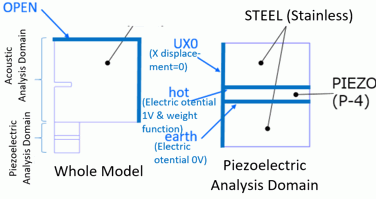
The model is a half model in 2D.
The domain for the piezoelectric analysis consists of an piezoelectric material and stainless steel. The electric potential-specified boundary conditions of hot and earth are set to the piezoelectric material. The electric potential 0 [V] is set to “earth” and the voltage oscillating in sine wave is set to “hot”.
On the edge of X=0, a boundary condition with X displacement of zero is set.
The domain for acoustic analysis is air. The open boundary condition is set to the domain for the acoustic analysis.
Body Number/Type |
Body Attribute Name |
Material Name |
0/Sheet |
STEEL |
104_Stainless_steel * |
1/Sheet |
PIEZO |
000_P4 * |
2/Sheet |
STEEL |
104_Stainless_steel * |
13/Sheet |
AIR |
000_Air * |
(*) Available from the material DB. However, the value of 1/Qm for 000_P4 is changed to 0.4 in order to suppress the vibration after driving by voltage.
Body Attribute Name |
Analysis Domain (Solver) |
PIEZO |
Piezoelectric Analysis (Rayleigh) |
STEEL |
Piezoelectric Analysis (Rayleigh) |
AIR |
Acoustic Analysis (Mach) |
Cautions: In this analysis, it is necessary to specify the analysis domain. Specify either piezoelectric analysis or acoustic analysis on the analysis domain tab.
Boundary Condition Name/Topology |
Tab |
Boundary Condition Type |
Settings |
OPEN/Edge |
Acoustic |
Open Boundary |
|
US0/Edge |
Mechanical |
Displacement |
UX=0, UY=0 |
hot/Edge |
Electric |
Electric Potential |
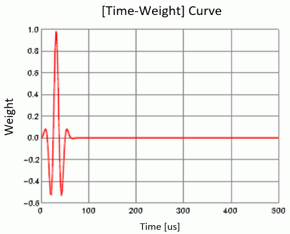
Specify Electric Potential = 1 [V] ☑ Time Dependency Weight is as in the graph below |
earth/Edge |
Electric |
Electric Potential |
Specify Electric Potential = 0 [V] |
The driving frequency is set to 40 kHz as explained in the analysis condition. Using a spreadsheet, the sine wave of 40 kHz is created, and part of it is used for the [time - weight] graph.
The numerical data created on the spreadsheet can be copied and pasted to the [Time - Weight] table.
| Piezoelectric Analysis | 1: 4.107499e+04 Hz |
| Displacement [m] | Z component |
| 0° | Linear |
The result fields can be viewed.
At [Results] tab - [Display] - [Solver],select [Piezoelectric Analysis] to see the results of the piezoelectric-resonant analysis.
Of the three vibration modes that were solved, this mode has the largest coupling coefficient. The coupling coefficient can be confirmed in the result table.
The figure below is a contour diagram of Z displacement drawn over the displacement diagram.
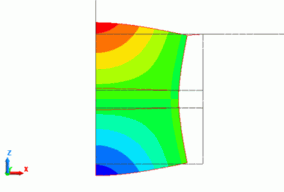
Fig. 1
| Piezoelectric/Time response | 24: 4.800000e-05 [s] |
| Displacement [m] | Z component |
| Linear |
At [Results] tab - [Display] - [Solver],select [Piezoelectric/Time Response] to see the results of the [Transient Analysis].
Here, you can examine the vibration when the [time - weight] graph is applied. The [time - weight] graph is specified for the boundary condition “hot”. Fig. 2(b) is a Z displacement graph that is observed at a point A in Fig. 2(a). The mode is on the horizontal axis.
Fig. 2(a) is a contour diagram at the time indicated by a marker in Fig. 2(b). A contour diagram is drawn over the displacement diagram. The vibration occurs in the mode shown in Fig. 1.

Fig. 2(a) Fig. 2(b)
| Acoustic Analysis | 82: 1.640000e-04 [s] |
| Sound Pressure [Pa] | Value |
| Linear |
At [Results] tab - [Display] - [Solver],select [Acoustic Analysis] to see the results of the acoustic analysis.
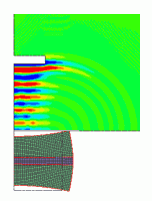
The sound pressure distribution is shown in Fig. 3. The sound pressure driven by the piezoelectric material reaches the obstacle placed in the center.
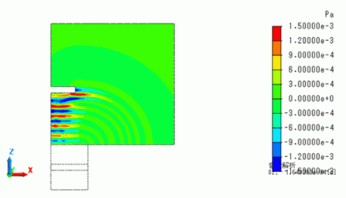
Fig. 3
Fig. 4 is a power graph. In the Result Table, set solver to [Acoustic Analysis], set selection mode to [Show all results summary] , and select [Power] tab. Then press Graph button to draw a graph with time on the horizontal axis and power on the vertical axis.
The power becomes negative at around 300us. It indicates that the waves return after reflection at the obstacle.
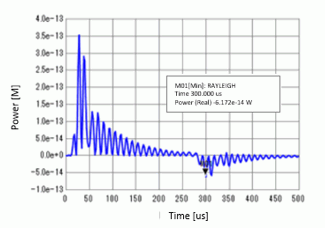
Fig. 4
The sound pressure distribution at 300[us] is shown below. As expected, it is confirmed that the reflected waves return to the piezoelectric material from the obstacle.
| Acoustic Analysis | 150: 3.0000e-04 [s] |
| Sound Pressure [Pa] | Value |
| Linear |
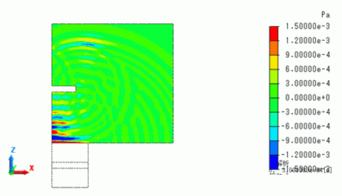
Fig. 5