General
Home / Examples / Coupled Analysis / Piezoelectric-Acoustic Analysis [Rayleigh/Mach] / Example 5: Violin
A piezoelectric-acoustic coupled analysis is applied though the analysis model does not contain piezoelectric material. A stress-acoustic coupled analysis can be applied as well.
Results will vary depending on Femtet version and the PC environment.
Unless specified in the list below, the default conditions are applied.
Item |
Settings |
Analysis Space |
3D |
Model Unit |
m |
The solvers are Rayleigh and Mach.
Item |
Settings |
Solver |
Piezoelectric Analysis [Rayleigh] Acoustic Analysis [Mach] |
Analysis Type |
Harmonic Analysis |
Variables to Constrain |
Electric Potential: Selected X Displacement: Deselected Y Displacement: Deselected Z Displacement: Deselected |
The harmonic analysis tab is set up as follows.
The sound waves propagate outside the analysis domain. Therefore the default open boundary condition below is applied.
Tab |
Setting Item |
Settings |
Harmonic Analysis |
Sweep Values |
Single Frequency 196*g+294.7*d+440*a+659.26*e |
Open Boundary Tab |
Type |
Absorbing Boundary |
Order of Absorbing Boundary |
1st-order |
|
Coordinates of Origin |
x = y = z = 0 |
The variables a, d, e, and g are used to switch the frequencies. In the project file on this page, the settings are e=1 and a=d=g=0. The frequency of 659.26 [Hz] is analyzed.
[Reference]
Violin has four strings E, A, D, and G from high to low.
Eigenfrequency of E string: 659.26 [Hz]
Eigenfrequency of A string: 440 [Hz]
Eigenfrequency of D string: 294.7 [Hz]
Eigenfrequency of G string: 196 [Hz]
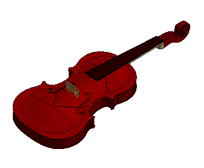
The model consists of the violin and the air. The violin is a piezoelectric analysis domain and the air is an acoustic analysis domain.
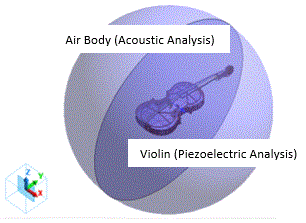
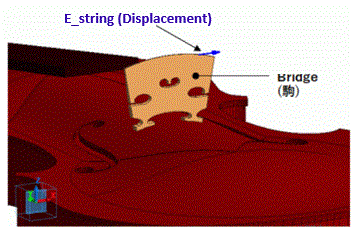
The strings are not created in this model. The driving boundary is directly applied to the bridge.
The driving boundary condition (E_String) is applied to the contact face where the the E string and the bridge are supposed to be in contact on the actual violin.
Body Number/Type |
Body Attribute Name |
Material Name |
28,29/Solid |
AIR |
000_Air(dry) * |
0/Solid |
Back |
Wood |
23/Solid |
Bridge |
Wood |
3/Solid |
Busbar |
Wood |
12/Solid |
Fingerboard |
Wood |
1/Solid |
Front |
Wood |
13/Solid |
Neck |
Wood |
14/Solid |
Scroll |
Wood |
11/Solid |
Side |
Wood |
24/Solid |
Soundpost |
Wood |
5,6,7,8,9,10/Solid |
Support |
Wood |
* Available from the material DB
Body Attribute Name |
Analysis Domain (Solver) |
AIR |
Acoustic Analysis (Mach) |
Back |
Piezoelectric Analysis (Rayleigh) |
Bridge |
Piezoelectric Analysis (Rayleigh) |
Busbar |
Piezoelectric Analysis (Rayleigh) |
Fingerboard |
Piezoelectric Analysis (Rayleigh) |
Front |
Piezoelectric Analysis (Rayleigh) |
Neck |
Piezoelectric Analysis (Rayleigh) |
Scroll |
Piezoelectric Analysis (Rayleigh) |
Side |
Piezoelectric Analysis (Rayleigh) |
Soundpost |
Piezoelectric Analysis (Rayleigh) |
Support |
Piezoelectric Analysis (Rayleigh) |
Material Name |
Tab |
Settings |
Wood |
Density |
700 [kg/m3] |
Piezoelectricity |
Material Type: Non-Piezoelectric Anisotropy: Isotropic Young's Modulus: 9 [GN/m2] Poisson's Ratio: 0.3 1/Qm: 0.0 |
The body specified as “wood” is entirely a piezoelectric analysis domain. The sound speed is not required to set as it is for an acoustic analysis.
Bounda ry Condition Name/Topology |
Tab |
Boundary Condition Types |
Setting |
A_string/Face |
Mechanical |
Displacement |
UX: vib_a |
D_string/Face |
Mechanical |
Displacement |
UX: vib_d |
E_string/Face |
Mechanical |
Displacement |
UX: vib_e |
Fix/Face |
Mechanical |
Displacement |
UX=0 UY=0 UZ=0 |
G_string/Face |
Mechanical |
Displacement |
UX: vib_g |
Outer |
Acoustic |
Open |
Open |
The variables used for the boundary condition are as follows.
vib_a=0.1*a
vib_b=0.1*b
vib_e=0.1*e
vib_g=0.1*g
where the variables a, b, e, and g are used to specify the frequency. In the project file, since the settings are e=1 and a=b=g=0, the boundary condition E_String only gives vibrations.
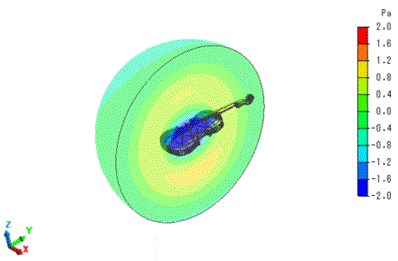
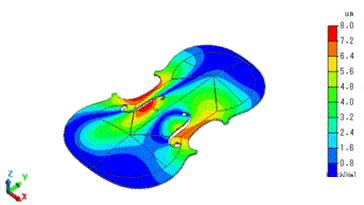
The results at 659.26 [Hz] are shown below.
The displacement diagram in the piezoelectric analysis is shown.
The color contour shows the absolute value of Z-displacement (Absolute is selected for Phase). The unit is [um].
Switching the result field to the acoustic analysis, the sound pressure distribution can be confirmed.