General
Home / Examples / Piezoelectric Analysis [Rayleigh] / Example 2: Harmonic Analysis
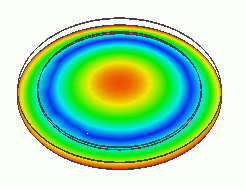
The model is a piezoelectric disc.
The AC voltage applied across the top and bottom faces generates the spreading vibration.
The device's displacement is solved.
Unless specified in the list below, the default conditions will be applied.
Results will vary depending on Femtet version and the PC environment.
Item |
Settings |
Analysis Space |
3D |
Model Unit |
mm |
Item |
Settings |
Solver |
Piezoelectric Analysis [Rayleigh] |
Analysis Type |
Harmonic Analysis |
Options |
N/A |
The harmonic analysis tab is set up as follows.
Tabs |
Setting Item |
Settings |
Harmonic Analysis |
Frequency |
Minimum: 1000 [Hz] Maximum: 1000 [Hz] |
Sweep Type |
Select [Linear Step by Division Number] Division: 0 |
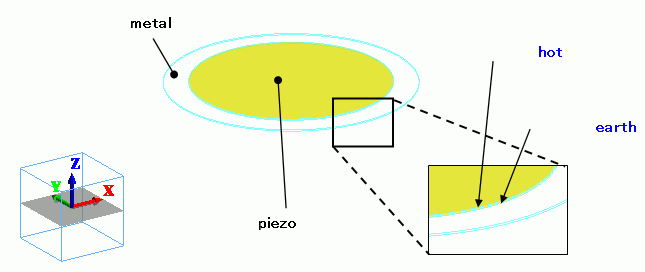
The piezoelectric disc (piezo) is placed on top of the aluminum disc (metal).
The electric potential is specified on the top and bottom faces.
Body Number/Type |
Body Attribute Name |
Material Name |
0/Solid |
metal |
001_Al * |
1/Solid |
piezo |
000_P-4 * |
* Available from the material DB
Boundary Condition Name/Topology |
Tab |
Boundary Condition Type |
Settings |
earth/Face |
Electric |
Electric Wall |
Electric Potential Specified: Electric Potential 0 [V] |
hot/Face |
Electric |
Electric Wall |
Electric Potential Specified: Electric Potential 1 [V] |
The gradation contour of the displacement is shown below.
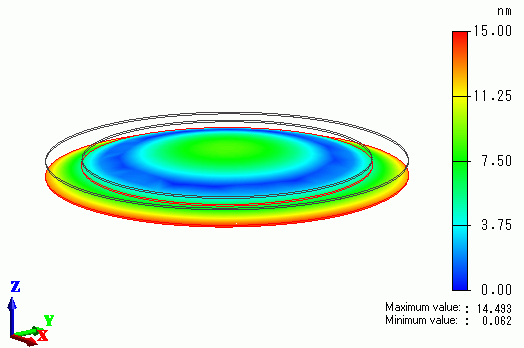
The piezoelectric disc's vibration causes the distortion on the aluminum disc.