Home / Examples / Piezoelectric Analysis [Rayleigh] / Example 19: Tensile Force and Resonant Frequency (Harmonic Analysis)
To analyze the effect of tension, resonant analysis is used in Example 13 while harmonic analysis is used in this example
[Analysis with the initial stress taken into account] is applied. See Analysis with initial stress taken into account for the details.
The frequency response of the displacement is solved.
Analysis 1: Apply the static load to the bar and pull it at both ends.
Analysis 2: Fix the bar at both ends. Vibrate it by applying the voltage. The resultant displacement in the Analysis 1 is used to take into account the hardening effect of tensile force.
Item |
Settings |
Analysis Space |
3D |
Model Unit |
mm |
Item |
Settings |
Solver |
Piezoelectric Analysis [Rayleigh] |
Analysis Type |
Static Analysis |
Options |
N/A |
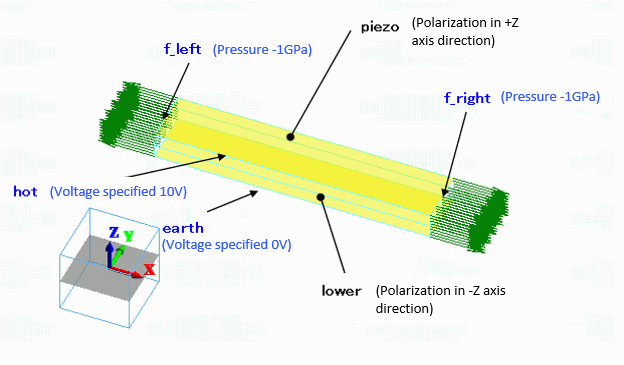
Two reversely polarized piezoelectric bars are stuck together. The ends are set with the [Pressure] boundary condition.
The top and bottom faces are set with the [Electric Potential Specified] Boundary condition.
Body Number/Type |
Body Attribute Name |
Material Name |
0/Solid |
upper |
000_P-4 * |
1/Solid |
lower |
000_P-4 * |
(*) Available from the material DB
The polarizations are set as follows.
Body Attribute Name |
Tab |
Settings |
upper |
Direction |
Specified by: Vector Vector: X=Y=0.0, Z=1.0 |
lower |
Direction |
Specified by: Vector Vector: X=Y=0.0, Z=-1.0 |
Boundary Condition Name/Topology |
Tab |
Boundary Condition Type |
Settings |
earth/Face |
Electric |
Electric Wall |
Electric Potential Specified: Electric Potential 0 [V] |
hot/Face |
Electric |
Electric Wall |
Electric Potential Specified: Electric Potential 10 [V] |
f_left/Face |
Mechanical |
Pressure |
-1X10⁹ [Pa] |
f_right/Face |
Mechanical |
Pressure |
-1X10⁹ [Pa] |
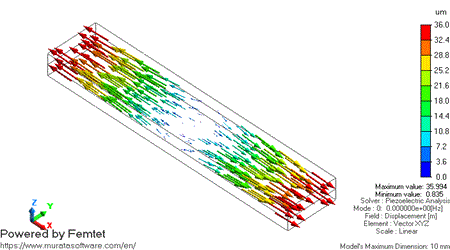
The bar is pulled at both ends. The vector diagram of the displacement is shown below.
Item |
Settings |
Solver |
Piezoelectric Analysis [Rayleigh] |
Analysis Type |
Harmonic Analysis |
Options |
Analysis with the initial stress taken into account Select Initial Stress Select Specify Analysis Model |
The harmonic analysis tab is set up as follows.
Tab |
Setting Item |
Settings |
Harmonic Analysis |
Sweep Values |
Minimum: 35 [kHz] Maximum: 50 [kHz] |
Sweep Type |
Select [Linear Step by Division Number]. Division: 50 |
|
Frequency Sweep |
Discrete Sweep |
Results Import Tab is set as follows.
Tab |
Setting Item |
Settings |
Results Import |
Specify Result |
For analysis model, select |
The analysis model is the same as Analysis 1 (Static Analysis) except that both ends are fixed in Analysis 2.
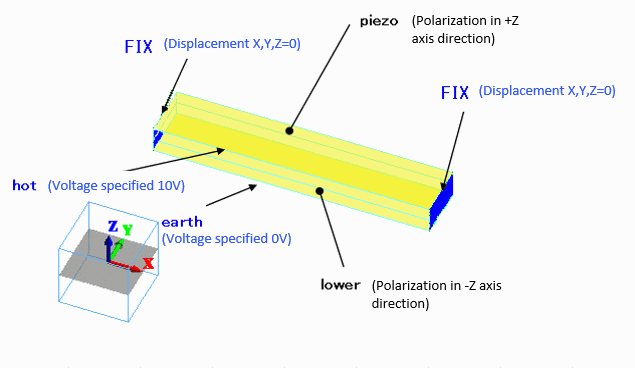
Same as Analysis 1.
Boundary Condition Name/Topology |
Tab |
Boundary Condition Type |
Setting |
FIX/Face |
Mechanical |
Displacement |
Select all UX/UY/UZ components. X=Y=Z=0.0 [mm]
|
earth/Face |
Electric |
Electric Wall |
Electric Potential Specified: Electric Potential 0 [V] |
hot/Face |
Electric |
Electric Wall |
Electric Potential Specified: Electric Potential 10 [V] |
The frequency response of displacement is solved by the analyses with and without the static load.
With Static Load/44.9 kHz Z Displacement/Absolute |
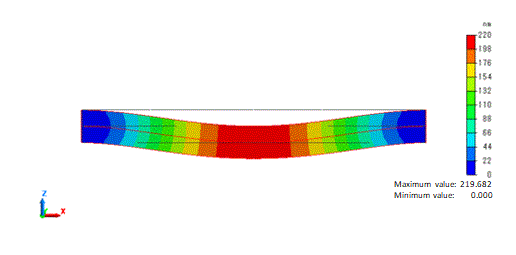 |
The contour above shows the displacement component Z absolute at the coordinates (5,1,0) near the resonant point in the analysis with static load.
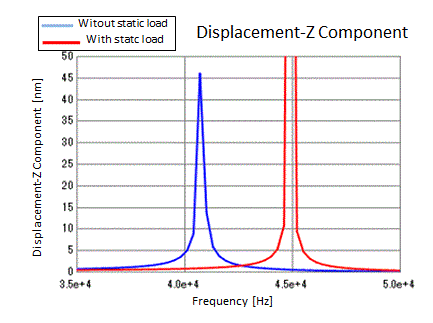
The peak shifts to the higher frequency due to the tensile force. This is the same effect as in the example 13 where it shifts from 4070 [Hz] to 4481 [Hz].
Note: The results of this example are obtained using Femtet2022.0.1.86015 (64 bit).
Displacement in the contour above and peak height in the graph (frequency characteristics of displacement-Z component) tend to be affected by meshes.
Please be aware that depending on the version of Femtet, the displacement may be affected significantly.
The peak frequency will remain at similar values.