General
Home / Examples / Piezoelectric Analysis [Rayleigh] / Example 27: Transient Analysis of Pressure Drive
Transient analysis is explained in this example.
Results will vary depending on Femtet version and the PC environment.
Unless specified in the list below, the default conditions will be applied.
Transient analysis is available in an optional package. However, transient analysis using resonant mode is not optional.
Item |
Settings |
Analysis Space |
2D |
Model Unit |
mm |
Item |
Settings |
Solver |
Piezoelectric Analysis [Rayleigh] |
Analysis Type |
Transient Analysis |
Transient Analysis Using Resonant Mode (Model 1) |
Deselected |
Transient Analysis Using Resonant Mode (Model 2) |
Selected |
For model 2, the settings on the resonant analysis tab are required.
The resonant analysis tab is set up as follows.
Tab |
Setting Item |
Settings |
Resonant Analysis (only for model 2) |
Number of Modes |
3 |
Approximated Frequency |
0 [Hz] |
|
Transient Analysis |
Timestep |
Select [Manual] |
Output Interval |
1 |
|
Calculation Steps |
100 |
|
Mesh |
Meshing Setup/Element Type |
Select [Rectangle] (**) |
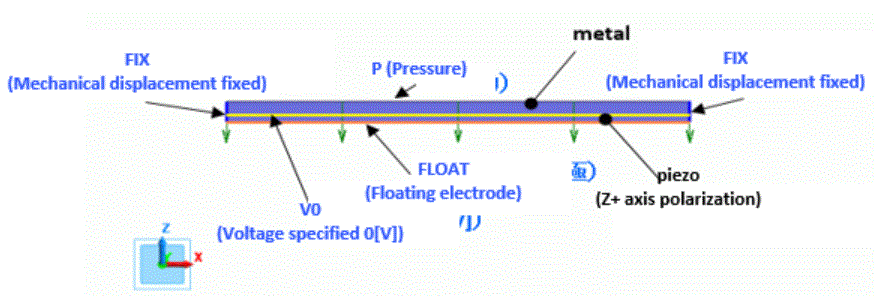
Body Number/Type |
Body Attribute Name |
Material Name |
0/Face |
METAL |
001_Al * |
1/Face |
PIEZO |
000_P-4 * |
* Available from the material DB
The time dependency of the applied pressure is defined by weight function.
Boundary Condition Name/Topology |
Tab |
Boundary Condition Type |
Settings |
P/Edge
|
Mechanical |
Pressure |
2 [Pa] Select [Time Dependency] Enter [Weight Function] as shown in the diagram below.
|
Electric |
Electric Wall |
Magnetic Wall |
|
V0/Edge |
Mechanical |
Free |
|
Electric |
Electric Wall |
Specify electric potential: Electric Potential 0 [V] |
|
FLOAT/Edge |
Mechanical |
Free |
|
Electric |
Electric Wall |
Floating Electrode |
|
FIX/Edge |
Mechanical |
Displacement |
UX=0.0, UY=0, UZ=0 |
Electric |
Magnetic Wall |
|
Below are the [Weight Function] table of the pressure-specified boundary condition and graphs. Since the input pressure is 2 [Pa] and the maximum weight is 1, the maximum value of the applied pressure is also 2 [Pa].

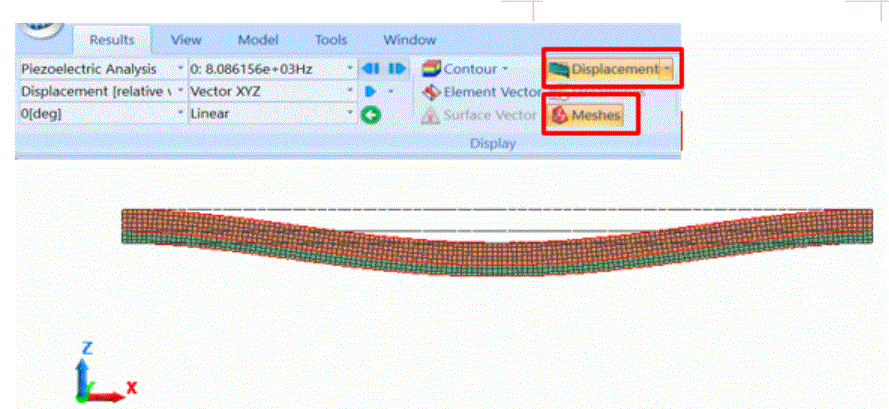
The displacement diagram is shown below with the mesh diagram.
Shown below is the X normal stress of the result of the last analysis time.

Shown below is the electric potential distribution of the result of the last analysis time.

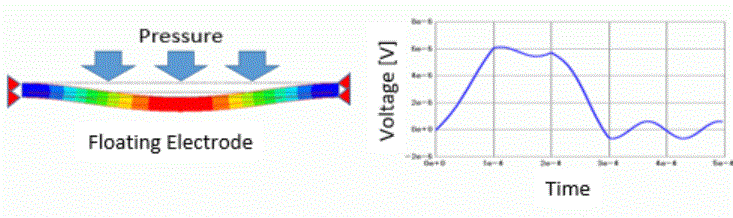
The electric potential change of the floating electrode over time is shown in the graph below.
The horizontal axis is the modes. The coordinates on the floating electrode are specified. The coordinates can be obtained with the mouse.
The overlapping plots of results of models 1 and 2 are shown below. They match very well.
For the [Type] on the [Field Graph Setting] tab , select [Horizontal Axis: Mode (frequency, time, step, etc)]
For overlapping plots, see [drag-and-drop on the graph window].
