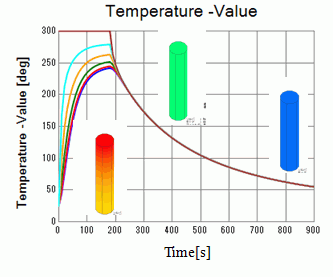
General
Home / Examples / Thermal Analysis [Watt] / Example 18 : Restart under Different Boundary Condition
The boundary condition is changed from [Temperature] to [Heat Transfer/Convection-Ambient(Radiation)] before the transient analysis is restarted.
The temperature distribution and the heat flux vectors are solved.
Unless specified in the list below, the default conditions will be applied.
Results will vary depending on Femtet version and the PC environment.
Item |
Settings |
Analysis Space |
3D |
Model Unit |
mm |
Item |
Settings |
Solver |
Thermal Analysis [Watt] |
Analysis Type |
Transient Analysis |
Options |
N/A |
The transient analysis tab is set up as follows. The initial temperature is 25 [deg] and the timestep is 10 [sec].
The calculation steps are 18 before the restart and 72 after the restart.
Default Setting
Tab |
Setting Item |
Settings |
||||||||
Transient analysis |
Table |
|
||||||||
Restart |
Deselect [Continue from the last session] |
|||||||||
Initial Temperature |
25 [deg] |
The settings for the restart
Tab |
Setting Item |
Settings |
||||||||
Transient analysis |
Table |
|
||||||||
Restart |
Select [Continue from the last session] |
|||||||||
Initial Temperature |
N/A |
* After finishing analysis with default setting, change the analysis conditions and boundary conditions. Then restart the analysis by clicking Run Mesher/Solver -> Run Solver.
The initial temperature of the cylindrical body is 25[deg]. The top face is set to 300[deg] with the temperature boundary condition.
The boundary condition is changed to the natural convection and the ambient radiation in the next leg.
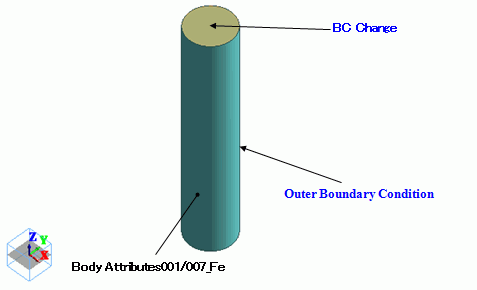
Body Number/Type |
Body Attribute Name |
Material Name |
0/Solid |
A001 |
007_Fe * |
* Available from the material DB
Change the boundary condition of BC_Change in the interval between the first and second transient analyses as follows.
Boundary Condition Name/Topology |
Tab |
Boundary Condition Type |
Settings |
BC_Change/Face (Default) |
Thermal |
Temperature |
300 [deg] |
BC_Change/Face (for Restart) |
Thermal |
Heat Transfer/Convection |
Natural Convection (Automatic Coefficient Calculation) |
Radiation Type: Ambient (Speed Prioritized) |
Select Individual Setting Emissivity: 1.0 Room Temperature (Ambient Temperature): 25 [deg] |
||
Outer Boundary Condition |
Thermal |
Heat Transfer/Convection |
Natural Convection (Automatic Coefficient Calculation) |
Radiation Type: Ambient (Speed Prioritized) |
Emissivity: 1.0 Room Temperature (Ambient Temperature): 25 [deg] |
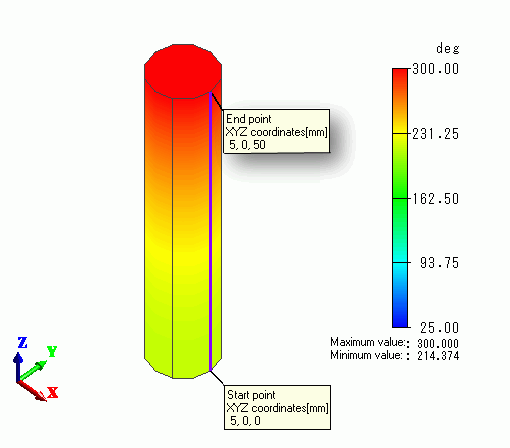
Diagram below shows the temperature distribution at 90 [s].
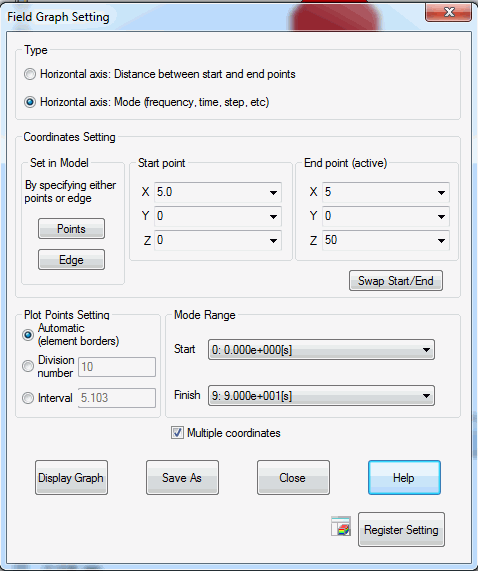
The temperatures of 5 points in the model will be drawn through the following chart setting. The 5 points for the chart are set at regular intervals form the bottom to the top.
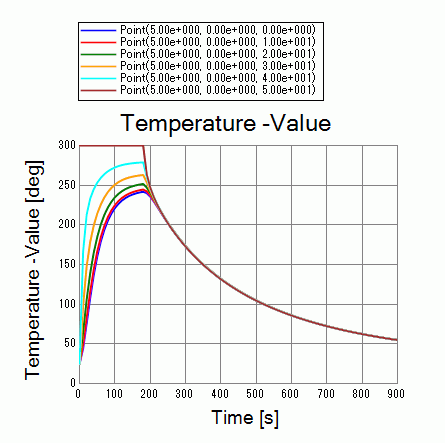
The temperatures increase for the first 180 sec. But after the boundary condition on the top face is changed, they decrease.