General
Home / Examples / Thermal Analysis [Watt] / Example 16: Radiation Blocked by a Disc (Steady-State Analysis)
A disc is placed between two plates, creating a space. The heat radiation from one plate to the other is blocked by the disc.
The temperature distribution and the heat flux vectors are solved.
Unless specified in the list below, the default conditions will be applied.
Results will vary depending on Femtet version and the PC environment.
Item |
Settings |
Analysis Space |
3D |
Model Unit |
mm |
Item |
Settings |
Solver |
Thermal Analysis [Watt] |
Analysis Type |
Steady-state Analysis |
Options |
N/A |
A disc is placed in between two plates.
The temperature of the bottom face of the lower plate is fixed at 1000 [deg]. The top face of the upper plate is set with natural convection.
How the disc affects the radiation is analyzed.

The surface-to-surface radiation analysis of symmetric model is supported in version 2020.0 and later.
The above is a model diagram of the full model. The project file contains two symmetric models (half and quarter models) as well.
Both models require less analysis time than the full model and produce results similar to the full model.
*For the symmetric models, the heat source of the body is reduced to half for the half model and one quarter for the quarter model.
The following values are manually entered so that the coefficient for the natural convection becomes the same as the full model.
L (Typical Length) = (0.01 x 0.01 x 2) / (0.01 + 0.01) = 0.01
con = 2.51 × 0.52 × L^-0.25 = 4.127
Body Number/Type |
Body Attribute Name |
Material Name |
0/Solid |
Body_Attribute_001 |
008_Cu |
1/Solid |
Body_Attribute_003 |
002_Polycarbonate(PC) |
2/Solid |
Body_Attribute_002 |
002_Polycarbonate(PC) |
The heat source of the Body_Attribute_001 is set as follows.
Body Attribute Name |
Tab |
Settings |
Body_Attribute_001 |
Heat Source |
2 [W] |
The boundary conditions are set as follows:
Boundary Condition Name/Topology |
Tab |
Boundary Condition Type |
Settings |
Radiation/Face |
Thermal |
Radiation Type: Surface-to-surface (Accuracy Prioritized) |
Select [Individual Setting] Emissivity: 0.5 Ambient Radiation Temperature: 25 [deg] |
Radiation2/Face |
Thermal |
Radiation Type: Surface-to-surface (accuracy prioritized) |
Select Individual Setting Emissivity: 0.99 Ambient Radiation Temperature: 25 [deg] |
Radiation3/Face |
Thermal |
Radiation type: Surface-to-surface (accuracy prioritized) |
Select Individual Setting Emissivity: 0.5 Ambient Radiation Temperature: 25 [deg] |
HighTemperatureWall/Face |
Thermal |
Temperature |
1000 [deg] |
0/Face |
Thermal |
Temperature |
0 [deg] |
NaturalConvection/Face |
Thermal |
Heat Transfer: Convection |
Natural Convection (Automatic Coefficient Calculation) Room Temperature 25 [deg] |
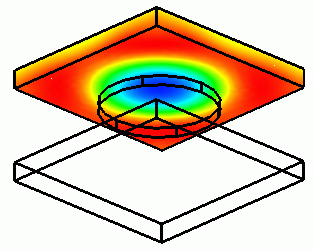
The diagram below shows the temperature distribution of the upper plate.
The other bodies are hidden for the results display, and [Exclude Hidden Bodies] is selected at Minimum/Maximum Values on the Contour tab of Graphics Setup.

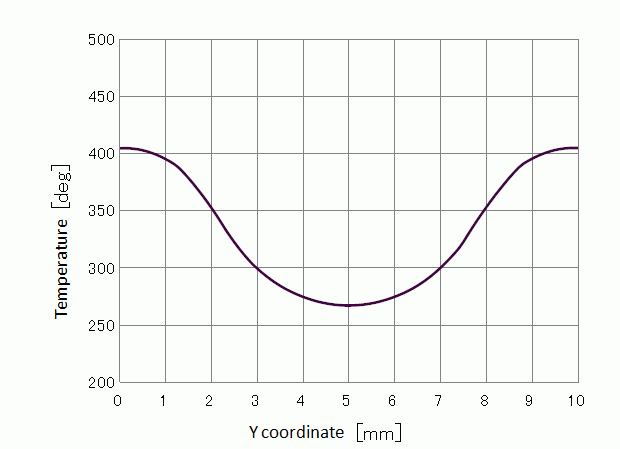
The center portion is around 260 [deg] whereas the peripheral portion is over 410 [deg].
The disc is blocking the heat radiation.
The plot below indicates the temperature across the two points: (5, 0, 5) and (5, 10,5).
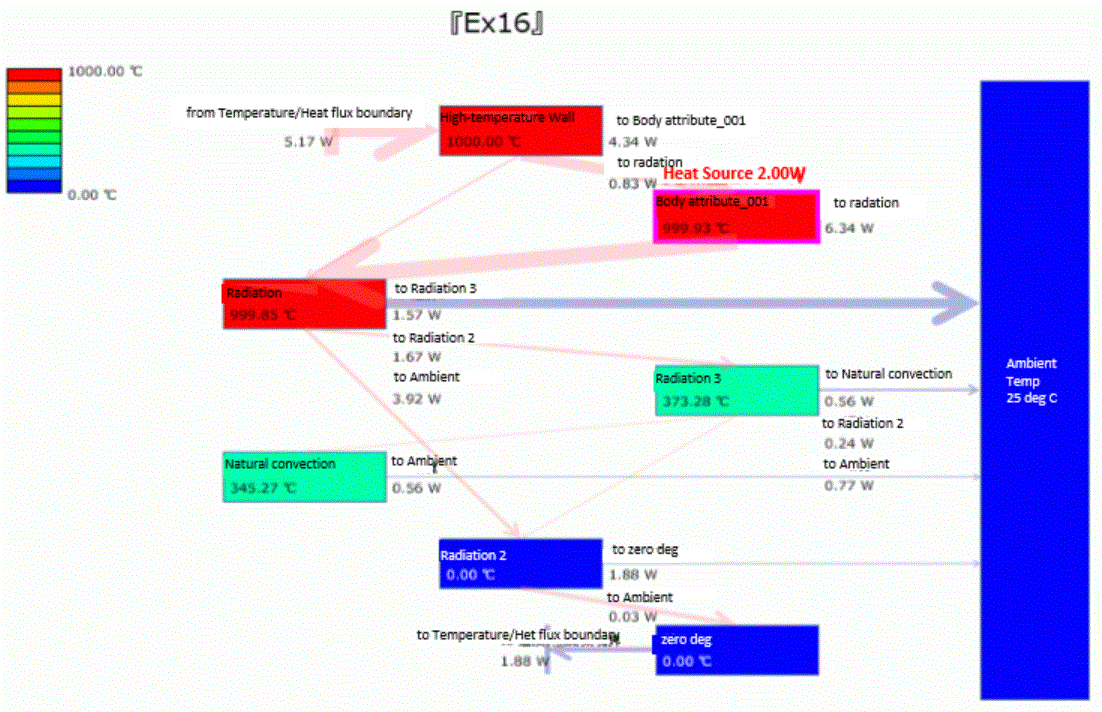
To evaluate the overall heat flow, [Visualization Tool for Heat Path] is used.
Open [Ex16_heatflow_el.csv] to show the visualized results.
It can be observed the heat is transferred from “Radiation” boundary to the ambient, “Radiation2” (disc), and “Radiation3” (lower plate).