General
Home / Examples / Thermal Analysis [Watt] / Example 20: Further Analysis with Saved Temperature Data (Transient Analysis)
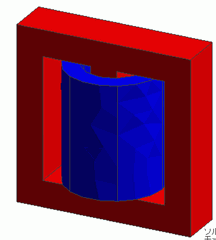
The results of [Example 4: Heating due to the Iron Loss (Temperature-Dependent Materials)] of the magnetic-thermal coupled analysis is used as the initial temperature to perform the heat dissipation analysis.
The result of the magnetic-thermal coupled analysis is used as an initial temperature.
The models of the magnetic-thermal coupled analysis and transient thermal analysis are prepared in one project.
The temperature distribution and the heat flux vectors are solved.
Unless specified in the list below, the default conditions will be applied.
Results will vary depending on Femtet version and the PC environment.
Item |
Settings |
Analysis Space |
3D |
Model Unit |
mm |
Item |
Settings |
Solver |
Thermal Analysis [Watt] |
Analysis Type |
Transient Analysis |
Options |
None |
The setting on the transient analysis tab are as follows. As the calculation steps is 20 and the timestep is 30 sec, the temperature distributions for 10 minutes
are solved where the resulting temperature of the magnetic-thermal coupled analysis is set to the initial temperature.
Tabs |
Setting Item |
Settings |
||||||||
Transient Analysis |
Table |
|
||||||||
Results import |
Import Type |
Initial Temperature |
||||||||
Specify Results |
Specify analysis model "gauwat_ex4" |
|||||||||
Specify Mode |
Automatic |
Basically the same as Example 4: Heating due to the Iron Loss (Temperature-Dependent Materials),

Body Number/Type |
Body Attribute Name |
Material Name |
Mesh Size |
0/Solid |
Coil |
008_Cu * |
1 |
1/Solid |
Core |
Core |
2 |
* Available from the material DB
The material properties of the core are set up as follows.
Material Name |
Tab |
Settings |
Core |
Thermal Conductivity |
Thermal Conductivity: 10 [W/m/deg] |
Density |
Density: 7000 [kg/m3] |
|
Specific Heat |
Specific Heat: 800 [J/Kg/deg] |
Select "Natural convection (automatic calculation)" on the outer boundary condition.
Boundary Condition Name/Topology |
Tab |
Boundary Condition Type |
Settings |
Outer Boundary Condition * |
Heat |
Heat Transfer: Convection |
Natural Convection (Automatic Coefficient Calculation) Ambient Temperature: 25 [deg] |
* To set the outer boundary condition, on the [Model] tab,
click [Outer Boundary Condition Setting] .
.
* The correction coefficient for the natural convection is calculated automatically. For the details, please refer to the Thermal tab.
To take in the temperature, in the magnetic-thermal coupled analysis, firstly run the analysis model, "gauwat_ex4",
and then run the analysis model, "wat_ex20".
The initial temperature is set according to the results of the magnetic-thermal coupled analysis.
The result at the time 0s is the temperature distribution taken in.
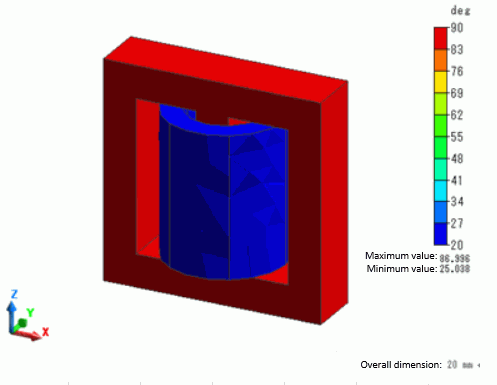
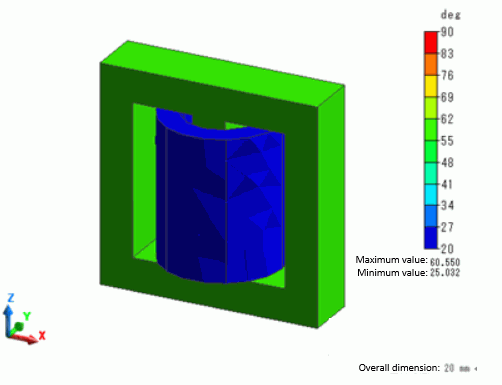
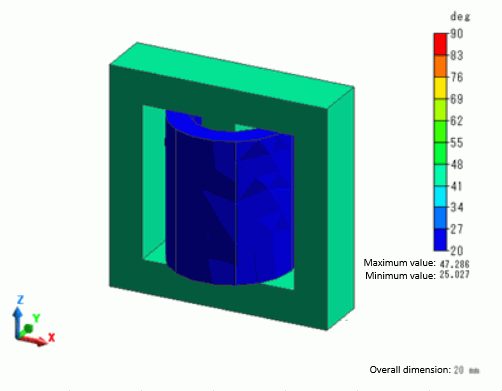
The temperature distributions in 30s, 300s and 600s are shown below.
The range of color scale is fixed from 20 [deg] to 90 [deg].
The temperature of Core goes down over time.
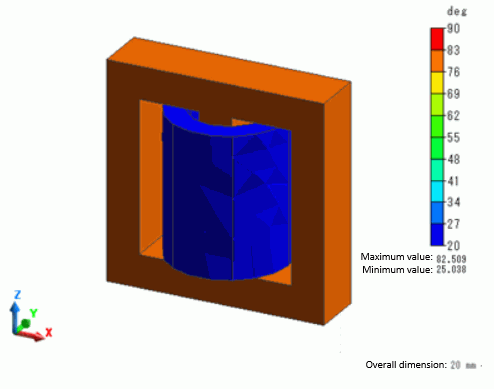
Temperature Distribution in 30 sec
Temperature Distribution in 300 sec
Temperature Distribution in 600 sec