General
Home / Examples / Thermal Analysis [Watt] / Example 27: Radiation Blocked by a Disc (Steady-state Analysis) -Simple Setting-
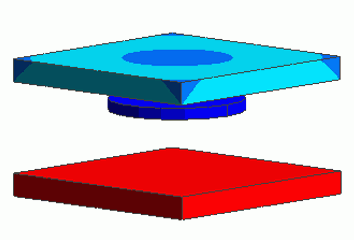
A disc is inserted in a space created by two plates.The heat radiation from one plate to the other is blocked by the disc.
A problem similar to [Example 16: Radiation Blocked by a Disc (Steady-state Analysis) ] is set up in a simpler way.
(Refer to the default setting of [Radiation: Equations and Setting Method.)
The temperature distribution and the heat flux vectors are solved.
Unless specified in the list below, the default conditions are applied.
Results will vary depending on Femtet version and the PC environment.
Item |
Settings |
Analysis Space |
3D |
Model Unit |
mm |
Item |
Settings |
Solver |
Thermal Analysis [Watt] |
Analysis Type |
Steady-state Analysis |
Analysis Options |
None |
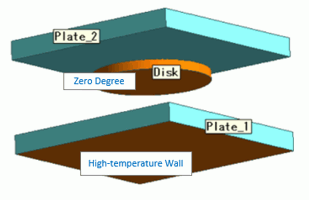
A disc is placed in between two plates.
The temperature of the bottom face of the lower plate is fixed at 1000 [deg]. The natural convection and surface-to-surface radiation are set to the surroundings.
How the disc affects the radiation to the upper plate is analyzed.
Body Number/Type |
Body Attribute Name |
Material Name |
0/Solid |
Plate_1 |
008_Cu |
1/Solid |
Disk |
002_Polycarbonate(PC) |
2/Solid |
Plate_2 |
002_Polycarbonate(PC) |
The emissivity of each body attribute surface is set as follows.
Body Attribute Name |
Tab |
Settings |
Plate_1 |
Thermal Surface |
Emissivity: 0.5 |
Plate_2 |
Thermal Surface |
Emissivity: 0.5 |
Disk |
Thermal Surface |
Emissivity: 0.99 |
The boundary conditions are set as follows:
Boundary Condition Name/Topology |
Tab |
Boundary Condition Type |
Settings |
Outer Boundary Condition |
Thermal |
Heat Transfer: Convection |
Natural Convection (Automatic Coefficient Calculation) Radiation Type: Surface-to-Surface (Accuracy Prioritized) |
HighTemperatureWall/Face |
Thermal |
Temperature |
1000 [deg] Radiation Type: Follow the outer boundary condition |
0/Face |
Thermal |
Temperature |
0 [deg] Radiation Type: Surface-to-Surface (Accuracy Prioritized) |
The radiation setting can be done at [Thermal Analysis tab] > [Radiation Setting] dialog box as well.
Shown below are the setting details.

The outer boundaries of the three bodies are treated as surfaces for the surface-to-surface radiation. The emissivities for each body attribute is viewed.
By clicking [Show all boundary conditions set for the body attribute], the display is switched as shown below.

As set for each item, [0] for Disk and [High Temperature Wall] for Plate_1 are displayed.
[Follow the outer boundary condition] is set to each of them and [Surface-to-surface (accuracy prioritized)] is set as an outer boundary condition. It is confirmed that all surfaces are treated as those for the surface-to-surface radiation.
The diagram below shows the temperature distribution of the upper plate.
(The body fields for the other bodies are hidden (right-click > hide body field).)
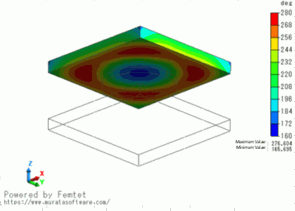
The center area is around 160[deg] whereas the other area is over 260[deg].
The disc is blocking the heat radiation.
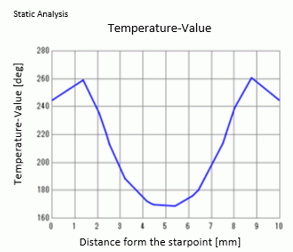
The plot below indicates the temperature across the two points: (5, 0, 5) and (5, 10,5).