


|
Home / Python script / Femtet Operation by Python
Femtet Operation by Python
How to operate Femtet by Python is explained here.
Sample Script
- Obtain sample script. (Self-extraction format)
-
This script is what was converted to Python script from a VBA macro file of Example 10 of the stress analysis.
- The following files will be extracted.
FemtetMacroSample.py (sample script itself)
- General flows of a sample script
- FemtetMain(): Main method
Activate Femtet automatically (auto_execute_femtet method of Python Femtet Utility Package)
↓
Create an instance of CFemtet class (win32com.client.Dispatch method)
↓
Create a new project (CFemtet.OpenNewProject method)
↓
Set analysis condition (AnalysisSetup method)
↓
Set body attribute (BodyAttributeSetup method)
↓
Set material property (MaterialSetUp method)
↓
Set boundary condition (SetBoundarySetUp method)
↓
Create a model (MakeModel method)
↓
Create meshes (CGaudi.Mesh method)
↓
Run solver (CFemtet.Solve method)
↓
Extract results (SamplingResult method)
- How to run the sample script
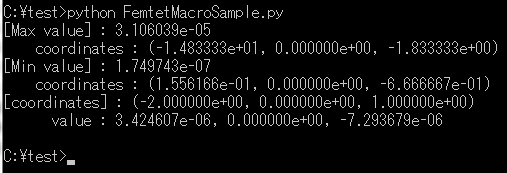
- The process of displaying the result values is described as a standard output in the sample script. Run the script on the command prompt.
- Run the following command on the command prompt.
python FemtetMacroSample.py
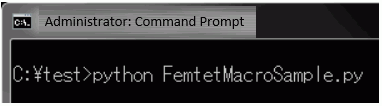
- Femtet is automatically activated. After the analysis is performed, the analysis results will be displayed on the command prompt as follows.
- Note
- By pressing Ctrl and Break keys together, script can be suspended.
How to Use Python Femtet Utility Package
- Python Femtet Utility Package allow you to activate Femtet and other applications by Python script.
- Describe an import of the Python Femtet utility package in the script to create. (Refer to the sample script)
from femtetutils import util, const
- Use a method.
- Example: Activate Femtet.
util.auto_execute_femtet()
How to Create an Instance of Femtet Interface Class
- The names of Femtet interface class are defined in the Python Femtet utility package. It is useful for creating an instance.
- The defined Femtet interface class is as follows.
CFemtet, CGaudiPoint, CGaudiVector, CGaudiPlane, CComplex, CSYZMatrix
- Describe an import of the Python Femtet utility package in the script to create. (Refer to the sample script.)
from femtetutils import util, const
- Create an instance of Femtet interface class for Python's variable. (Refer to the sample script.)
Femtet = Dispatch(const.CFemtet) # In the case of instantiating the CFemtet class
How to Use Constants of Femtet Macro
- To use Femtet macro constants (such as SOLVER_T, SPACE_T, DYNAMIC_T) with Python, the following definition is necessary.
- Describe an import of a package of "instance creation/reference to macro constant" in the script to create. (Refer to the sample script.)
from win32com.client import Dispatch, constants
- To use a constant in the script, describe constants.constant name as shown in red below.
Als.Hertz.Dynamic = constants.HARMONIC_C
Python-specific Methods and Properties
- About Python-specific methods and properties
- The standard methods and properties of Femtet are created so that Femtet can be operated by VB and VBA.
Some of the methods and properties do not work with Python.
- For the methods and properties which don't work with Python, Python-specific version is available.
The methods and properties only for Python are indicted by  in the method list and property list of Femtet Help.
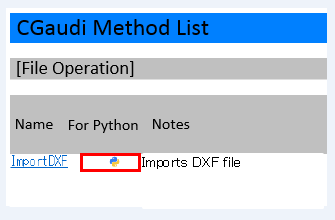
- The difference from the standard methods and properties
- For easy identification, [_py] is attached to the end of the method name and property name.
(Example) Standard method: CGaudi.CreateWire1 ⇒ Python-specific method: CGaudi.CreateWire1_py
- If multiple return values exist in a standard method, they are combined to one return value in the double type.
(Example) in the case of Standard method: CGaudi.FindBodyAll(Points() As CGaudiPoint, BodyList() As CGaudiBody) As Boolean,
the return values exist in BodyList() and FindBodyAll methods. (Two types of return values)
↓
In the case of Python-specific method: CGaudi.FindBodyAll_py(CGaudiPoint[] Points), multiple return values are FindBodyAll method
ret = FindBodyAll_py(Points)
where
ret[0] ⇒ returns True or False.
Ret[1][0 to The number of found bodies - 1] ⇒ returns dynamic array of the found bodies (CGaudiBody).
-
If multiple return values exist, multiple variables can be specified for each type in the left side.
(Example) For ret, bodies = FindBodyAll_py(Points),
the result (True/False) can be set to ret, and the dynamic array of bodies to bodies.
Caution for Shifting from VBA Macros
- Be sure to describe ( ) in the case of macro method without parameter. For Python, a method without ( ) is not an error, but the method is not executed.
(Example) CFemtet.Redraw(), CGaudiBody.Fit(), etc.
- If Python-specific method (xxx_py) are available, be sure to use them. A method without _py may result in an error, or unintended behavior without an error.
File Path
- Femtet macro methods support only "¥" as a file path delimiter.
The slash of "\" is not supported. To convert it, use the following code.
path = path.replace('/', '¥¥')