|
Home / Preparation for Macro Operation / Prepare Operating Environment for Python
Prepare Operating Environment for Python
Preparation to operate Femtet by Python script is explained here.
Preparation for Operating Environment
- Python for Windows 3.x must be installed. (x is a version number)
https://www.python.org/downloads/
-
The operation was verified with version 3.x.
- Python for Windows (pywin32) Extensions must be installed.
https://github.com/mhammond/pywin32/releases
-
The installer must support Python's version and OS type (32bits or 64bits).
-
When the Python Femtet utility package is installed, pywin32 will be installed automatically.
- PATH must be set so as to run Python and pip command on the command prompt of OS.
- C:¥Users¥userID¥AppData¥Local¥Programs¥Python¥Python3xx¥ (x is a version number)
- C:¥Users¥userID¥AppData¥Local¥Programs¥Python¥Python3xx¥Scripts¥ (x is a version number)
- Femtet macros must be enabled. (Procedure)
How to Introduce Python Femtet Utility Package
- It allows you to activate Femtet or other applications with Python script.
- The name of Femtet interface classes specified by the win32com.client.Dispatch method can be specified in a simple form.
- Example: Formal name is "FemtetMacro.Femtet" and its simplified name is "CFemtet."
-
The initialization needs to be executed for each user. If virtual environments have been created, for instance, by venv, each virtual environment must be initialized.
- Installation Procedure
- Obtain the Python Femtet utility package file (femtetutils-x.x.x-py3-none-any.whl). (x.x.x ) is a version number.
- Copy it in a folder.
- Open the command prompt from the start menu.
- Execute the following commands.
cd [the folder in step 2]
pip install --upgrade femtetutils-x.x.x-py3-none-any.whl (x.x.x ) is a version number.
-
The Python Femtet utility package file is installed.
-
If pywin32 has not been installed, it will be installed automatically.
- If [Successfully installed femtetutils-x.x.x ... ] appears on the command prompt, the installation has finished.
-
Check whether femtetutils and pywin32 are installed by the pip list command.
Initialization by Makepy Tool (pywin32)
- Initialization is executed by makepy tool so that Python can use Femtet macro constants (such as DYNAMIC_T).
-
If macro is enabled after updating Femtet or Python, be sure that the initialization is executed.
-
The initialization needs to be executed for each user. If virtual environments have been created, for instance, by venv, each virtual environment must be initialized.
- Open the command prompt from the start menu.
- Execute the following commands.
python -m win32com.client.makepy FemtetMacro
-
If [Importing module] appears on the command prompt, the initialization has finished.
Close the command prompt.

Operation Verification
-
Obtain Python script for operation verification (self-extraction format). Extract a script file (check_femtet.py) to an arbitrary folder.
-
Open command prompt.
-
Type the following commands.
-
The commands cannot be executed unless PATH is set so as to run Python on the command prompt.
- cd [the folder in step 1]
- python check_femtet.py
-
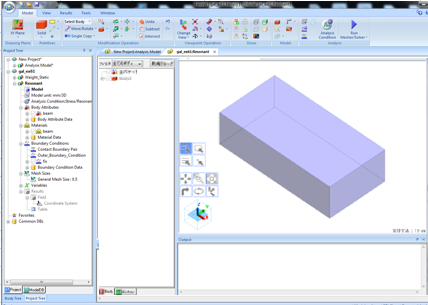
Check if Femtet is activated automatically and a rectangular solid is displayed on the Femtet window.