


|
Home / Simulation Accuracy Setting (Mesh/Element) / Meshing Setup / Automatic Adjustment Mesh size
Automatic Adjustment Mesh size
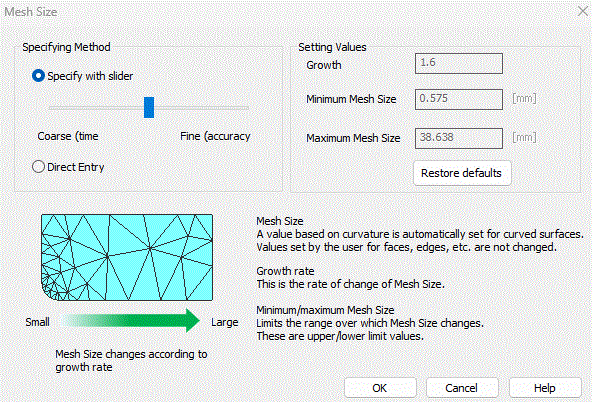
When [Automatic Adjustment (Detailed Settings available)] is selected in the Mesh Size setting on the Mesh tab, the mesh size is automatically adjusted and the mesh is generated.
Automatically sets the Mesh Size for curved surfaces considering to Curvature, and increases the Mesh Size according to the growth rate.
Mesh size is controlled to remain within the minimum and maximum mesh sizes.
Mesh Sizes individually set for topologies are maintained, so Individual Setting with automatic adjustment can also be used.
The figure below shows an example of a mesh generated by using [Automatic Adjustment].
Mesh is finer in curved areas and coarser elsewhere.

[Setting] Tab is for setting for growth rate, minimum mesh size and maximum mesh size.
|
Items |
Notes |
|
Growth Rate |
Ratio to increase the mesh size. |
|
Minimum Mesh Size |
Lower limit of Mesh size |
|
Maximum Mesh Size |
Upper limit of Mesh size |
|
Restore defaults |
Restore all defaults for growth rate, minimum mesh size and maximum mesh size. |