


|
Home / Calculation Speed Setting (Matrix Solver) / Iterative Method Setting
Iterative Method Setting
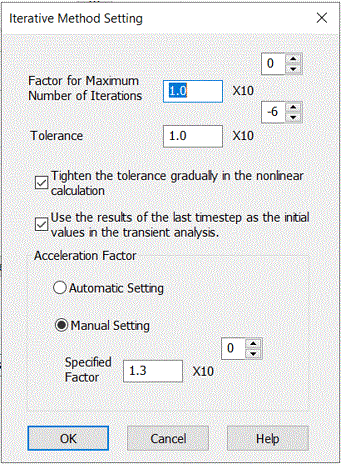
|
Setting Items |
Notes |
|
Factor for the maximum number of iterations |
Sets the maximum number of iterations. The iterative method solves the system of linear equations through the iterative calculations. The Iterative calculations will finish when the maximum number of iterations is reached, which is given by the the number of variables or approximately the number of the elements multiplied by this coefficient. |
|
Tolerance |
Finishes the iteration when the calculation reaches within the tolerance. Enter the smaller value for high-accuracy calculation. The calculation time, however, will be longer. |
|
Tighten the tolerance gradually in the nonlinear calculation |
Available only for the magnetic-transient analysis.
The tolerance is gradually tightened and eventually the tolerance value is set. In most cases, the calculation time for convergence is shortened, but not always.
|
|
Use the results of the last timestep as the initial values in the transient analysis. |
Available only for the magnetic-transient analysis.
In the nonlinear analysis, the results obtained in the last timestep are used as the initial values for the next timestep in order to achieve the fast convergence. In the case of non-convergence with iterative method, the calculation may converge by setting this option off. In some cases, line search may solve problem.
Specifically, when the time interval is relatively large, if the previous results are used, convergence may worsen or the calculation may diverge, and the solution may not be found. For example, this method is useful for rotating machine analysis where the rotation angle each time is large, from a few degrees to tens of degrees.
|
|
Automatic setting for the acceleration factor |
Achieves faster converge if an appropriate acceleration factor is given. Select the automatic setting to have the acceleration factor calculated automatically. |
|
Manual setting for the acceleration factor |
Sets the factor manually if the calculation does not coverge with the automatic setting. The value may be between 1.05 and 1.50. |