|
Home / How to Set Body Attribute, Material Property and Boundary Condition / Time Dependency Setting
Time Dependency Setting
In the transient analysis, time dependency can be set by table input.
Enter up to the final time that is shown at the bottom of the table.
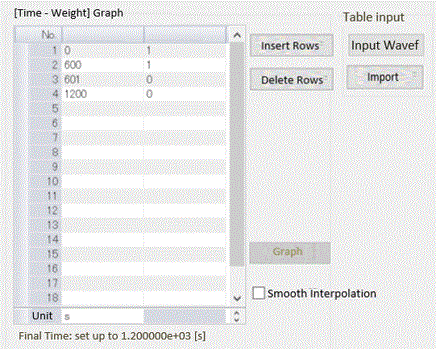
Table Input
As an auxiliary function, table input by [Import] and [Waveform Input] are selectable.
Import is for reading csv file for the table input.
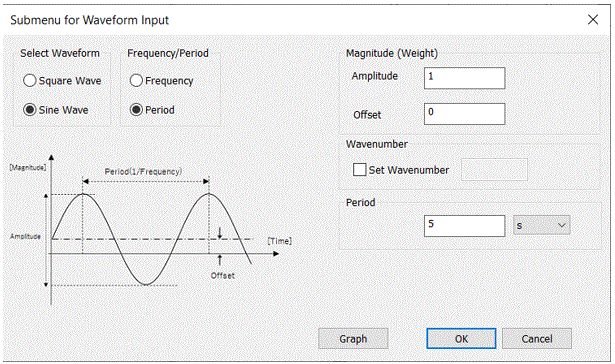
Waveform Input is for specifying amplitude and period for the table input
The waveform can be viewed in the input dialog box.
Note: This function is not activated if automatic step is selected for the analysis condition.
|
Waveform Selection |
Duty Ratio/Pulse Width |
Dialog Box |
Setting Value |
Note |
|
[Sine Wave] |
- |
|
[Final Time in the Table] [Frequency] or [Period] Maximum and Minimum of [Amplitude]
|
20 data points will be plotted in one period for interpolation. Unless the weight is specified, the input unit can be selected for the amplitude. |
|
[Square Wave] |
[Duty Ratio] |
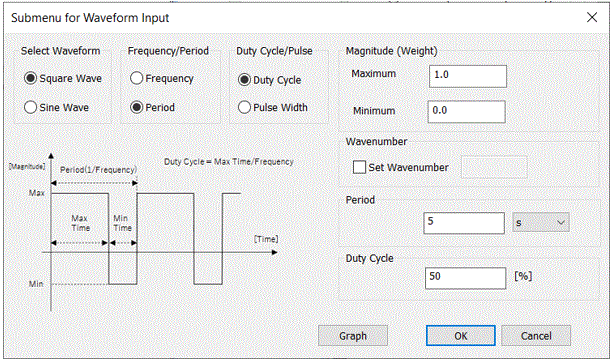 |
[Final Time in the Table] [Frequency] or [Period] Maximum and Minimum of [Amplitude] [Duty Ratio] (0 to 100%) |
The data points will be interpolated so that the rise and fall time of the square wave is 1/1000 of a period. Unless the weight is specified, the input unit can be selected for the amplitude.
|
|
[Square Wave] |
[Pulse Width] |
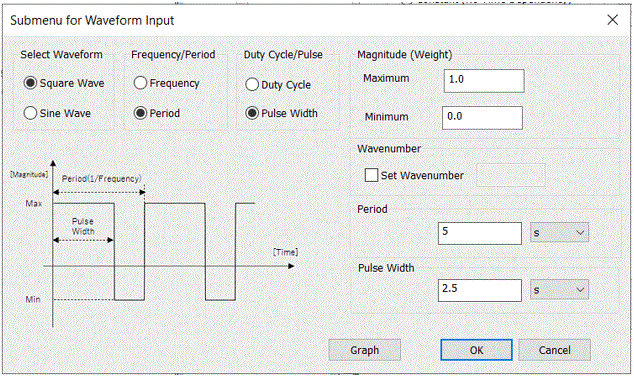 |
[Final Time in the Table] [Frequency] or [Period] Maximum and Minimum of [Amplitude] [Pulse Width] |
The data points will be interpolated so that the rise and fall time of the square wave is 1/1000 of a period. Unless the weight is specified, the input unit can be selected for the amplitude.
|