


|
Home / How to Set Body Attribute, Material Property and Boundary Condition / Boundary Condition Tabs / Acoustic Tab (Transient Analysis)
Acoustic Tab (Transient Analysis)
Analysis conditions for the acoustic analysis (transient analysis) are set on this tab.
It is in the [Edit Boundary Condition] dialog box. See [How to Set Boundary Condition].
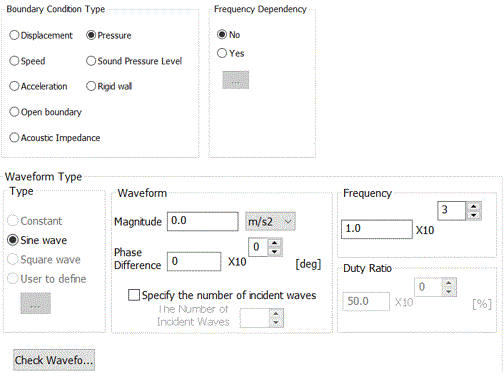
The boundary conditions that can be set for the transient analysis are listed below.
|
Boundary Condition Type |
Notes |
|
Displacement |
Specifies the driving displacement. |
|
Velocity |
Specifies the driving speed. |
|
Acceleration |
Specifies the driving acceleration. It can be used if the waveform is sine wave. |
|
Pressure |
Specifies the driving pressure. |
|
Sound Pressure Level |
Specifies the driving pressure by the sound pressure level [dB]. It can be used if the waveform is sine wave. |
|
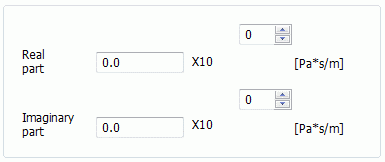
Acoustic Impedance |
Specifies the acoustic impedance. The imaginary part cannot be set in the transient analysis. |
|
Open Boundary |
Applies to the infinite space where the sound waves travel without reflection. |
|
Rigid Wall |
Applies to the non-vibrating boundary. |
-
The frequency dependency is selectable for the harmonic analysis only.
If pressure, displacement, speed, or acceleration are selected as a boundary condition type, the incident waveform must be set as these condition types are incident boundaries.
To check the waveform, press  .
.
If the number of incident waves is specified, all waveforms will be displayed. If the number is not specified, the waveform of one period will be displayed.
|
Waveform Type |
Notes |
|
|
Type |
Constant |
The waveform of a certain size is constantly incident at all times. |
|
Sine wave |
The incident waveform is the sine wave. The number of waves and the phase to start incidence can be specified. |
|
|
Square wave |
The incident waveform is the square wave. The number of waves and the phase to start incidence can be specified. |
|
|
User to define |
The user-defined incident waveform is applied.
|
|
|
Waveform |
Magnitude |
Specifies the maximum value of the incident waveform. It can be specified if the waveform type is either constant, sine wave, or square wave. |
|
Phase |
Specifies the phase to start the incidence. It can be specified if the waveform type is either sine wave or square wave to which the frequency can be set. For the phase Θ, the time to begin the incidence is |
|
| The number of incident waves |
Specifies the number of incident waves. If it is not specified, the incidence is made at all times. It can be specified if the waveform type is either sine wave or square wave. |
|
|
Frequency |
Specifies the frequency for the incident wave. It can be specified if the waveform type is either sine wave or square wave. |
|
|
Duty Cycle |
Applicable if the waveform type is square wave.
The duty cycle represents the ratio of the incidence in one period. |
|
 to be clicked to open a table for setting.