|
Home / Examples / Fluid Analysis [Bernoulli] / Example 12: Room Ventilation
Example 12: Room Ventilation
General
-
Ventilation in the room is analyzed.
-
Diffusion analysis simulates how air is replaced with another air by ventilation, where air before ventilation is “1” and air after ventilation is “0”.
See Diffusion Analysis of technical note for more information on air replacement in the transient analysis.
-
Steady-state mode of the fluid analysis and transient mode of the diffusion analysis are applied.
-
Unless specified in the list below, the default conditions are applied.
-
Obtain this session's project file. (Right-click and choose 'Save link as')
-
Results will vary depending on Femtet version and the PC environment.
Analysis Space
|
Item |
Setting |
|
Analysis Space |
3D |
|
Model Unit |
m |
Analysis Conditions
|
Item |
Tab |
Setting |
||||||||
|
Solver |
Solver Selection |
Fluid Analysis [Bernoulli] |
||||||||
|
Analysis Type |
Fluid Analysis |
Steady-state Analysis |
||||||||
|
Timestep |
Transient Analysis |
Timestep: Specified
|
||||||||
|
Setup Details |
Fluid Analysis |
Enable [Calculate quasi-steady state in the case of non-convergence]. |
||||||||
|
Diffusion Analysis |
Fluid Analysis |
Select Diffusion Analysis |
||||||||
|
Diffusion Analysis Setting |
Fluid Analysis |
Analysis Type: Transient Analysis Type and Unit of Diffusion Quantity: No Unit Initial Value: 1 |
||||||||
|
Meshing Setup |
Mesh |
General Mesh Size: 0.3 [m] |
Model
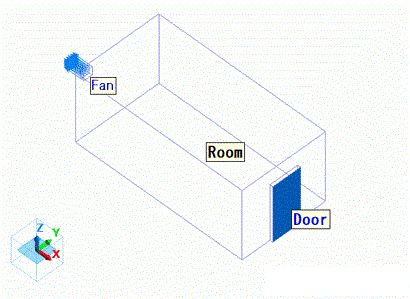
The air domain is shown as below. The model represents a room with a ventilator and a door. The door is assumed to be opened.
Body Attributes and Materials
|
Body Number/Type |
Body Attribute Name |
Material Name |
|
3/Solid |
Room |
000_Air * |
* Available from the material DB
Boundary Condition
|
Boundary Condition Name/Topology |
Tab |
Boundary Condition Type |
Setting |
|
Door/Face |
Fluid |
Inlet/Outlet |
Natural inflow/outflow |
|
Fan/Face |
Fluid |
Outlet |
45 [m3/min] |
Results
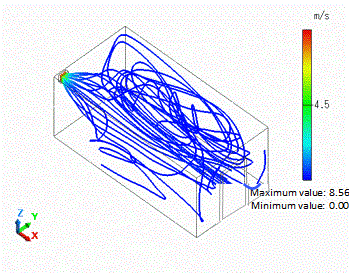
Streamlines of the quasi-steady state are shown below.
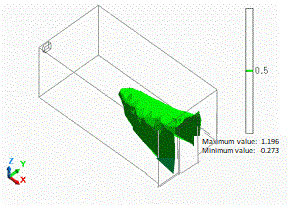
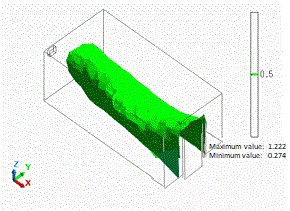
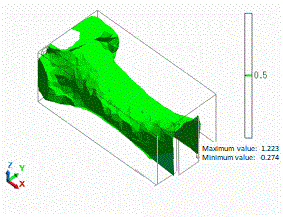
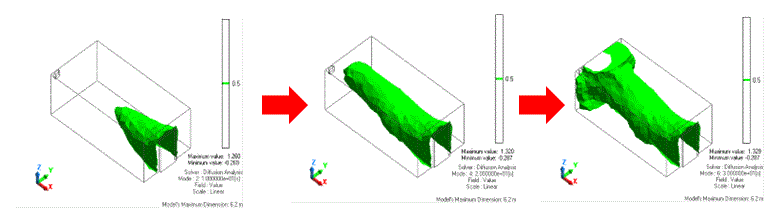
The isosurface contours after 10 [s], 20 [s], and 30 [s] are shown as below. Specified value is 0.5.
The isosurface at 0.5 represents the boundary of old air and new air.
You can see the boundary moves from the door toward the ventilator over time.
|
|
Isosurface Contour |
|
Time: 10 [s] |
|
|
Time: 20 [s] |
|
|
Time: 30 [s] |
|