|
Home / Examples / Fluid Analysis [Bernoulli] / Example 20: Room Ventilation (Air of Humidity)
Example 20: Room Ventilation (Air of Humidity)
General
-
The case where the air of 60% humidity flows into the room of air of 30% humidity through its window is analyzed.
The case where the air of 30% humidity flows into the room of air of 30% humidity from the door is analyzed.
-
A comparison has been made between two cases: one taking into account the weight of water vapor, and the other not.
-
See [Diffusion Analysis] for setting 30% and 60% humidity.
-
Unless specified in the list below, the default conditions are applied.
-
Simulation Time: around 50 min
-
Obtain this session's project file. (Right-click and choose 'Save link as')
-
Results will vary depending on Femtet version and the PC environment.
Analysis Space
|
Item |
Settings |
|
Analysis Space |
3D |
|
Model Unit |
m |
Analysis Conditions
|
Item |
Tab |
Settings |
||||||||
|
Solver |
Solver Selection |
Fluid Analysis [Bernoulli] |
||||||||
|
Analysis Type |
Fluid Analysis |
Transient Analysis |
||||||||
|
Timestep |
Transient Analysis |
Timestep: Specify
|
||||||||
|
Diffusion Analysis |
Fluid Analysis |
Select Diffusion Analysis |
||||||||
|
Diffusion Analysis Setting |
Fluid Analysis |
Analysis type: Transient Analysis Type and Unit of Diffusion Quantity: Molar Concentration
Ambient Value (Default Value): 0.3834 [mol/m3] See [Diffusion Analysis] for setting 30% humidity. Initial Value: Use ambient value
Take into account buoyancy:
|
||||||||
|
Pressure Correction |
Fluid Analysis |
Select Correct the pressure condition to balance with buoyancy. |
||||||||
|
Meshing Setup |
Mesh |
General Mesh Size: 0.3 [m] |
Model
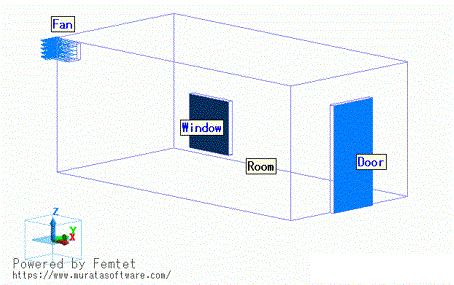
The air domain is shown as below. The model represents a room with a ventilator, a door, and a window. The door and the window are assumed to be opened.
Body Attributes and Materials
|
Body Number/Type |
Body Attribute Name |
Material Name |
|
5/Solid |
Room |
000_Air * |
* Available from the material DB
Boundary Condition
|
Boundary Condition Name/Topology |
Tab |
Boundary Condition Type |
Settings |
|
Door/Face |
Fluid |
Inlet/Outlet |
Natural Inflow/Outflow Diffusion Analysis Setting Select Use Ambient Value. |
|
Window/Face |
Fluid |
Inlet/Outlet |
Natural Inflow/Outflow Select [Direct Entry]. 0.7668 [mol/m3] See [Diffusion Analysis] for setting 60% humidity. |
|
Fan/Face |
Fluid |
Outlet |
45 [m3/min] |
Results
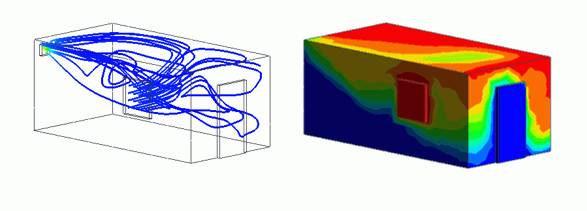
The streamlines of the flow coming from the window at 180 [s] is shown below.
If buoyancy is not taken into account, a direct flow toward the ventilator is observed, and if buoyancy taken into account, a flow circulating around the top of the room toward the ventilator is observed.
|
Take into account buoyancy |
Do not take into account buoyancy |
|
|
|
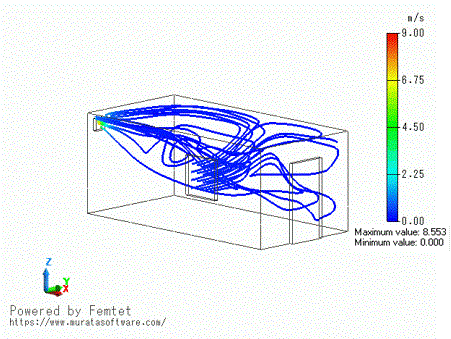
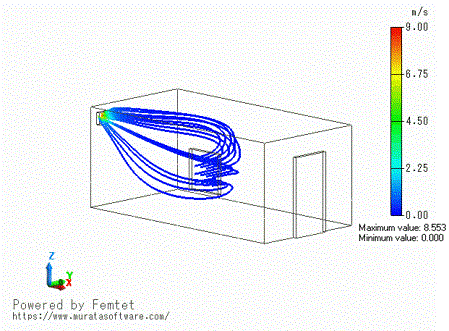
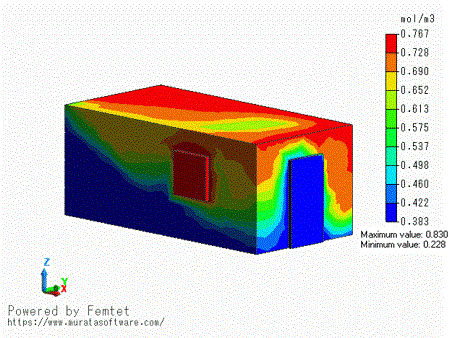
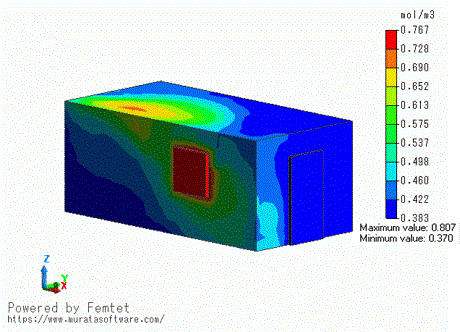
The contours of molar concentration after 180 [s] are shown below.
If buoyancy is taken into account, the area of high humidity spreads around the top of the room.
|
Take into account buoyancy |
Do not take into account buoyancy |
|
|
|