


|
Home / Examples / Stress Analysis [Galileo] / Example 69: Simplified Model for Bracket Analysis Using Remote Load
Example 69: Simplified Model for Bracket Analysis Using Remote Load
General
-
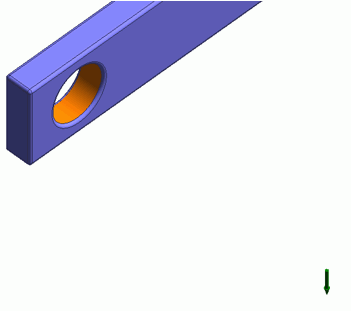
How to simplify an analysis model by using a remote load is explained.
-
A remote load is used if a torque load is taken into account as well as a distributed load.
-
Unless specified in the list below, the default conditions will be applied.
-
Obtain this session's project file. (Right-click and choose 'Save link as')
-
Results will vary depending on Femtet version and the PC environment.
Analysis Conditions
|
Item |
Settings |
|
Solver |
Stress Analysis [Galileo] |
|
Analysis Space |
3D |
|
Analysis Type |
Static Analysis |
|
Unit |
mm |
|
Analysis Options |
|
Model
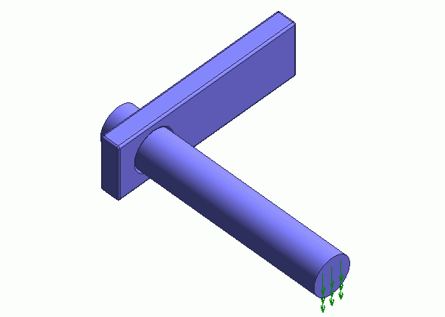
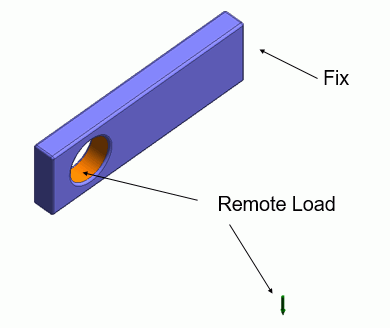
A load is applied to the bar of the model. The model can be simplified by using a remote load.
In the project file, Remote Load boundary condition is applied in Model 1 and Remote Load and Rigid Face boundary conditions are applied in Model 2. In Model 2, a remote load rigidly connected with a remote point can be applied. It can simulate the state where the joint parts of the bar and bracket are adhesive.
Body Attributes and Materials
|
Body Number/Type |
Body Attribute Name |
Material Name |
|
0/Solid |
Body_Attribute_001 |
001_Al * |
* Available from the material DB
Boundary Condition
|
Boundary Condition Name/Topology |
Tab |
Boundary Condition Type |
Setting |
|
RemoteLoad/Face |
Mechanical |
Model1 : Remote Load
Model 2: Remote Load and Rigid Face |
Coordinates of Remote Point X: 10×10^-3 [m] Y: -8×10^-3 [m] Z: 1.5×10^-3 [m] Remote Load X: 0.0 [N] Y: 0.0 [N] Z: -1.0 [N] |
|
Fix/Face |
Mechanical |
Displacement |
Ux: 0.0 Uy: 0.0 Uz: 0.0 [m] |
Results
The deformation diagram is shown below. The contour diagram shows the magnitude of displacement. The unit is [m].
Model1 : Remote Load
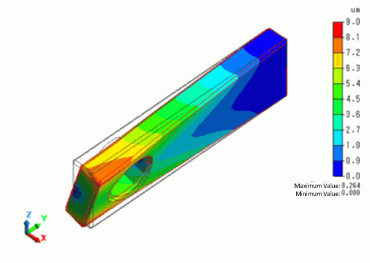
By setting a remote load, a torque displacement in the rotational direction is generated.
Model 2: Remote Load and Rigid Face
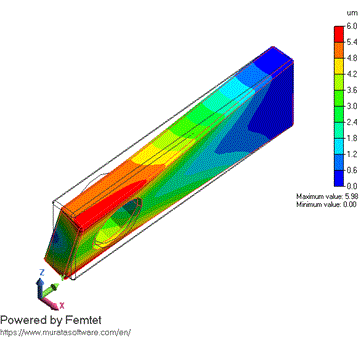
Since the hole portion is rigidly connected, it is observed that the displacement is totally smaller than that of model 1.