|
Home / Examples / Stress Analysis [Galileo] / Example 70: Stress Analysis Using Results (Pressure) Imported from Fluid Analysis
Example 70: Stress Analysis Using Results (Pressure) Imported from Fluid Analysis
General
-
The results (pressure) of Example 7 of fluid analysis are imported for the stress analysis.
-
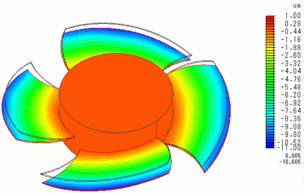
Deformation and mechanical stress of the fan blades due to the air pressure are analyzed.
-
Unless specified in the list below, the default conditions will be applied.
-
Obtain this session's project file. (Right-click and choose 'Save link as')
-
Results will vary depending on Femtet version and the PC environment.
The project file contains a model for fluid analysis (Fluid) and a model for stress analysis (Stress).
Analysis Conditions
To import the results of fluid analysis, set Pressure as an import type, Fluid as an import model, and Automatic as an import mode on the result import tab.
By setting Automatic as an import mode, the results at the final time are imported.
|
Item |
Settings |
|
Solver |
Stress Analysis [Galileo] |
|
Analysis Space |
3D |
|
Analysis Type |
Static Analysis |
|
Unit |
mm |
|
Result Import* |
Import Type Pressure
Specify Results Specify analysis model Fluid
Specify Mode Automatic |
Model
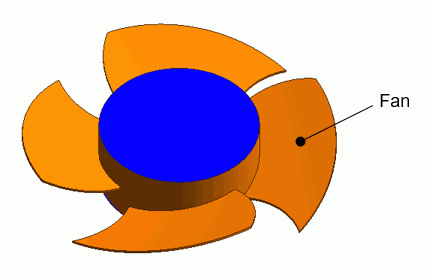
The body subjected to the stress analysis is a fan. The air domain and the case used for the fluid analysis are removed.
|
Body Number/Type |
Body Attribute Name |
Material Name |
|
25/Solid |
Fan |
104_Stainless_steel * |
* Available from the material DB
Boundary Condition
|
Boundary Condition Name/Topology |
Tab |
Boundary Condition Type |
Setting |
|
Fix/Face |
Mechanical |
Displacement |
Select all of X/Y/Z components. UX=0, UY=0, UZ=0 |
|
Outer Boundary Condition |
Mechanical |
Pressure |
Select Result Import |
Results
The deformation diagram is shown below. The air pressure is applied from the +Z direction and the fan blades are deformed in the -Z direction.