|
Home / Examples / Acoustic Analysis [Mach] / Example 4: Hemispherical Speaker
Example 4: Hemispherical Speaker
General
-
A hemispherical speaker is analyzed.
-
The distribution of sound pressure in the air is solved.
-
Unless specified in the list below, the default conditions will be applied.
-
Obtain this session's project file. (Right-click and choose 'Save link as')
-
Results will vary depending on Femtet version and the PC environment.
Analysis Space
|
Item |
Settings |
|
Analysis Space |
3D |
|
Model Unit |
mm |
Analysis Conditions
|
Item |
Settings |
|
Solver |
Acoustic Analysis [Mach] |
|
Analysis Type |
Harmonic Analysis |
|
Options |
N/A |
The harmonic analysis tab is set up as follows.
The sound waves propagate outside the analysis region. Therefore the [open boundary] condition below is applied initially.
The default conditions are applied.
|
Tab |
Setting Item |
Settings |
|
Harmonic analysis
|
Frequency: Sweep Values |
10 [kHz] |
|
Frequency: Sweep Type |
Single Frequency |
|
|
Frequency Sweep |
Discrete Sweep |
|
|
Open Boundary Tab |
Type |
Absorbing Boundary |
|
Order of Absorbing Boundary |
1st-order |
|
|
Coordinates of Origin |
x = y = z = 0 |
Model
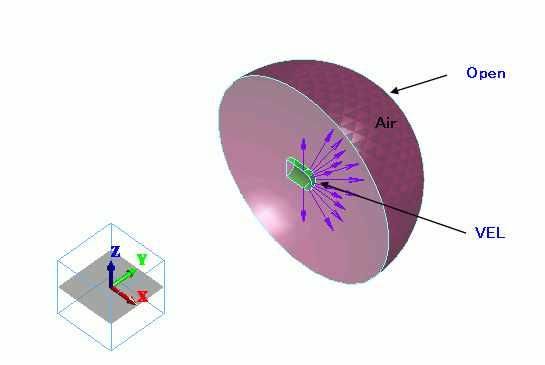
The air hemisphere is created from a solid body. The open boundary is set on the surface of the hemisphere.
A circular sheet body is defined for imprinting.
The velocity boundary condition is applied.
Body Attributes and Materials
|
Body Number/Type |
Body Attribute Name |
Material Name |
|
0/Solid |
Air |
000_Air(*) |
* Available from the material DB
The sound speed of air is set as follows.
|
Material Name |
Tab |
Settings |
|
000_Air(*) |
Sound Speed |
3.4X10² [m/s] |
Boundary Conditions
The [speed] boundary condition is set on the face of the imprinting body.
|
Boundary Condition Name/Topology |
Tab |
Boundary Condition Type |
Settings |
|
Open/Face |
Acoustic |
Open Boundary |
|
|
VEL/Face |
Acoustic |
Speed |
1 [m/s] |
Results
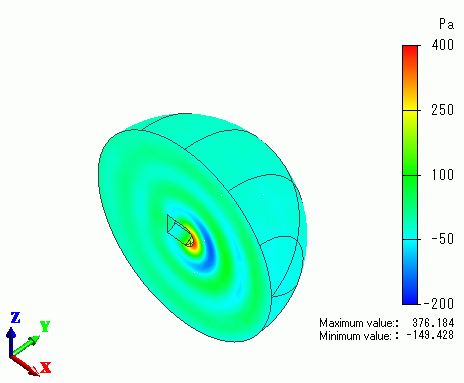
The gradation contour of the sound pressure at the driving frequency of 100 [Hz] is shown below.