


|
Home / Examples / Coupled Analysis / Piezoelectric-Acoustic Analysis [Rayleigh/Mach] / Example 1: Harmonic Analysis
Example 1: Harmonic Analysis
General
-
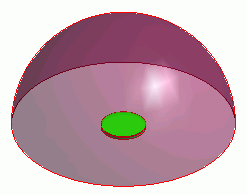
The model is a piezoelectric disc. The AC voltage applied across the top and bottom faces generates the vibration,
resulting in the emission of sound waves into the air.
-
This is a piezoelectric-acoustic coupled analysis.
-
Unless specified in the list below, the default conditions will be applied.
-
Please set the body attributes to solvers properly. Follow the settings on Body Attributes and Material below.
-
Obtain this session's project file. (Right-click and choose 'Save link as')
-
Results will vary depending on Femtet version and the PC environment.
Analysis Space
|
Item |
Settings |
|
Analysis Space |
3D |
|
Model Unit |
m |
Analysis Conditions
The solvers are Rayleigh and Mach.
|
Item |
Settings |
|
Solver |
Piezoelectric Analysis [Rayleigh] Acoustic analysis [Mach] |
|
Analysis Type |
Harmonic Analysis |
|
Options |
N/A |
The harmonics analysis tab is set up as follows.
The sound waves propagate outside the analysis region. Therefore the "open boundary" condition below is applied initially.
The default conditions will be applied.
|
Tab |
Setting Item |
Settings |
|
Harmonic analysis |
Frequency |
Minimum: 2000 [Hz] Maximum: 2000 [Hz] |
|
Sweep Type: Linear Step by Division Number |
Number of Divisions: 0 |
|
|
Open Boundary Tab |
Type |
Absorbing Boundary |
|
Order of Absorbing Boundary |
1st-order |
|
|
Coordinates of Origin |
x = y = z = 0 |
Model
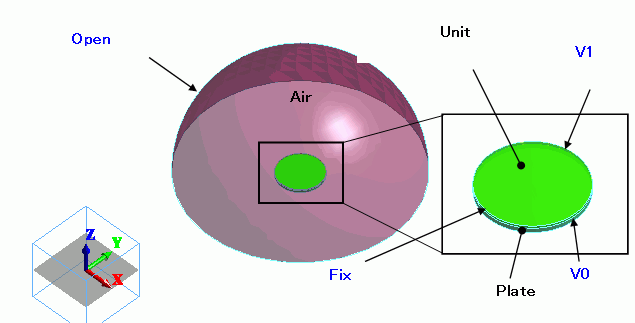
A piezoelectric disc (Unit) is placed on an aluminium disc (Plate). The hemispheric body (Air) covers the upper area.
Body Attributes and Materials
|
Body Number/Type |
Body Attribute Name |
Material Name |
|
0/Solid |
Air |
000_Air * |
|
1/Solid |
Unit |
000_P-4 * |
|
2/Solid |
Plate |
001_Al * |
* Available from the material DB
Unit and Plate are for the piezoelectric analysis only, whereas Air is for the acoustic analysis only.
|
Body Attribute Name |
Analysis Domain (Solver) |
|
Unit |
Piezoelectric Analysis (Rayleigh) |
|
Plate |
Piezoelectric Analysis (Rayleigh) |
|
Air |
Acoustic Analysis (Mach) |
Cautions:
In this analysis, it is required to specify the analysis domain.
That is to specify either piezoelectric analysis or acoustic analysis on the analysis domain tab.
Boundary Conditions
The side periphery of the model is fixed in the Z direction.
Electric wall is set on the top and bottom faces of the piezoelectric disc.
The open boundary is set on the hemispheric surface.
|
Boundary Condition Name/Topology |
Tab |
Boundary Condition Type |
Settings |
|
V0/Face |
Electric |
Electric Wall |
Electric Potential Specified: Electric Potential 0 [V] |
|
V1/Face |
Electric |
Electric Wall |
Electric Potential Specified: Electric Potential 10 [V] |
|
Fix/Face |
Mechanical |
Displacement |
Select UZ and set UZ=0 |
|
Open |
Acoustic |
Open Boundary |
|
Results
The magnitude of displacement is shown below.
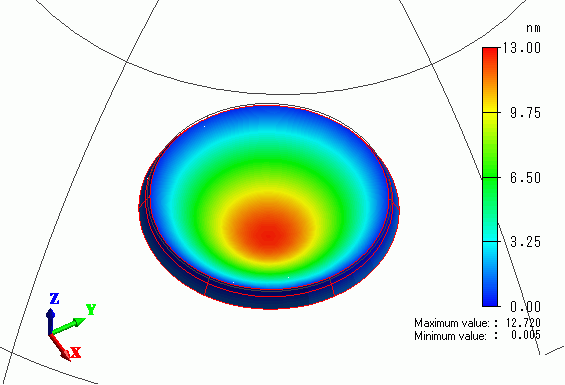
The largest displacement is indicated in the center area.
The contour of the sound pressure on the XZ section is shown below.
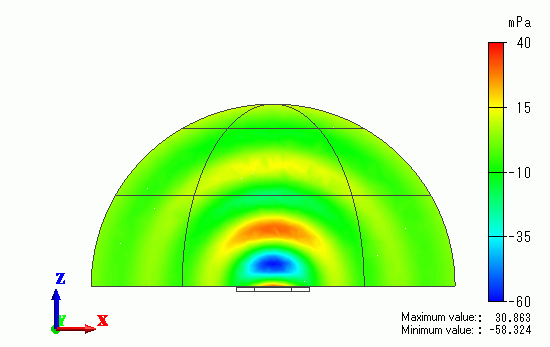
The sound waves are propagating from the top of the device.