|
Home / Examples / Piezoelectric Analysis [Rayleigh] / Example 5: Acceleration
Example 5: Acceleration
General
-
The model is a bar consisting of a metal plate and a piezoelectric plate stacked. An acceleration is applied to the bar, causing deformation.
-
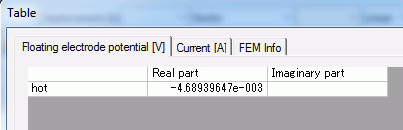
The electric potential of floating electrode and the displacement are solved.
-
Unless specified in the list below, the default conditions will be applied.
-
Results will vary depending on Femtet version and the PC environment.
Analysis Model Download
-
Project file Download (Save the project file before open. Femtet 2026 or later is required.)
Analysis Space
|
Item |
Settings |
|
Analysis Space |
3D |
|
Model Unit |
mm |
Analysis Conditions
|
Item |
Settings |
|
Solver |
Piezoelectric Analysis [Rayleigh] |
|
Analysis Type |
Static Analysis |
|
Options |
Select [Acceleration]. |
The acceleration tab is set up as follows.
|
Tab |
Setting Item |
Settings |
|
Acceleration |
Acceleration |
X=Y=0.0, Z=-9.8 [m/s2] |
It is accelerated in the negative Z direction.
Model
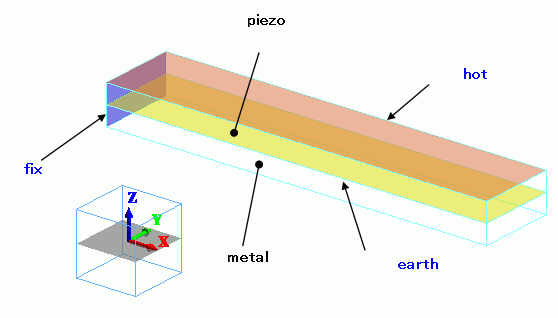
The piezoelectric and metal bars are piggybacked. The top face of the piezoelectric bar is the floating electrode (hot).
The bottom face is the electric wall set to 0 [V]. One end of the bar is mechanically fixed.
Body Attributes and Materials
|
Body Number/Type |
Body Attribute Name |
Material Name |
|
0/Solid |
piezo |
000_P-4 * |
|
1/Solid |
metal |
001_Al * |
* Available from the material DB
Boundary Conditions
|
Boundary Condition Name/Topology |
Tab |
Boundary Condition Type |
Settings |
|
fix/Face |
Mechanical |
Displacement |
Select all UX, UY, and UZ. UX=0, UY=0, UZ=0 |
|
earth/Face |
Electric |
Electric Wall |
Electric Potential Specified: Electric Potential 0 [V] |
|
hot/Face |
Electric |
Electric Wall |
Floating Electrode |
Results
To view the calculation results, go to the [Results] tab
and click [Show Numerical Summary Table]  .
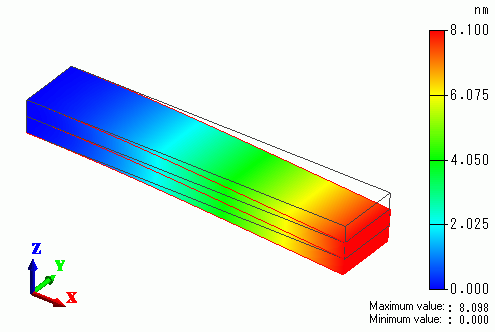
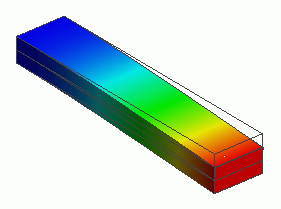
The displacement of the bar is shown below. The color contour indicates the magnitude of displacement.