|
Home / Examples / Piezoelectric Analysis [Rayleigh] / Example 11: Transient Analysis
Example 11: Transient Analysis
General
-
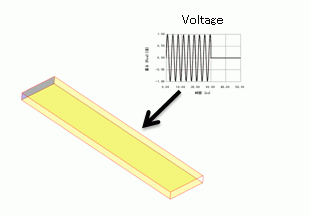
Transient analysis is explained in this example.
-
As a result, the displacement change over the time can be viewed.
-
Unless specified in the list below, the default conditions will be applied.
-
Obtain this session's project file. (Right-click and choose 'Save link as')
Model 1, "ImplicitMethod", is a transient analysis model. Simulation Time: 5 min 13 sec
Model 2, "ResonantMethod", is a transient analysis model using the resonant analysis.
Model 3, "ResonantMethod_auto", is a transient analysis model using the resonant analysis and its timestep is set automatically.
The difference between Models 1, 2, and 3 lies only in the analysis conditions. -
Results will vary depending on Femtet version and the PC environment.
-
Transient analysis is available in an optional package. However, transient analysis using resonant mode is not optional.
Analysis Space
|
Item |
Settings |
|
Analysis Space |
3D |
|
Model Unit |
mm |
Analysis Conditions
|
Item |
Settings |
|
Solver |
Piezoelectric Analysis [Rayleigh] |
|
Analysis Type |
Transient Analysis |
|
Transient Analysis Using Resonant Mode (Model 1) |
Deselected |
|
Transient Analysis Using Resonant Mode (Models 2 and 3)
|
Selected
|
The settings on the transient analysis tab are required.
For model 2, settings on the resonant analysis tab are required.
The resonant and transient analysis tabs are set up as follows.
|
Tab |
Setting Item |
Settings |
|
Mesh |
Order of Element | 1st-order Element (Time Prioritized) |
|
Resonant Analysis (only for Models 2 and 3) |
Number of Modes |
10 |
|
Approximated Frequency |
0 [Hz] |
|
|
Transient Analysis with Manual Setting (Models 1 and 2) |
Timestep |
Select [Manual] |
|
Output Interval |
5 |
|
|
Number of Calculation Steps |
1000 |
|
|
Transient Analysis with Automatic Setting (Model 3) |
Timestep |
Select [Automatic] |
*The results of model 2 show that the lowest resonant frequency is 455 kHz. The period (T0) is 2.2e-6 [sec]. When analyzing with timestep = T0/20 = 1.e-7, the difference in amplitude between Model 1 and Model 2 is observed. Consequently, the timestep = T/40 = 0.5e-7 is applied.
* For model 3, the timestep is automatically determined from the results of resonant frequencies.
One-tenth of a period of the highest resonant frequency is used as the timestep. (You can change the number of divisions per cycle)
Model (Common to Models 1, 2, and 3)
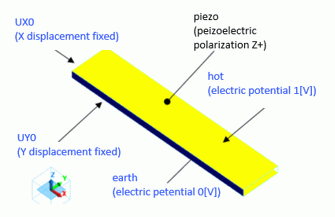
Body Attribute and Material Property Setting (Common to Models 1, 2, and 3)
|
Body Number/Type |
Body Attribute Name |
Material Name |
|
0/Solid |
piezo |
000_P-4 * |
* Available from the material DB
Boundary Condition (Common to Models 1, 2, and 3)
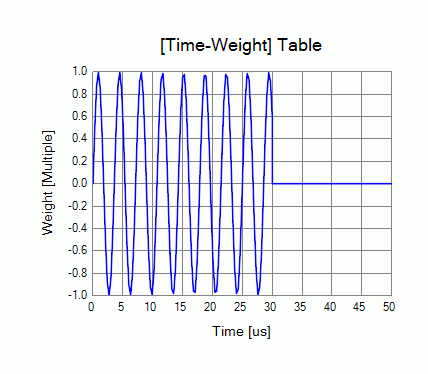
The time dependency of the applied voltage is defined by weight function.
|
Boundary Condition Name/Topology |
Tab |
Boundary Condition Type |
Settings |
|
earth/Face |
Electric |
Electric Wall |
Specify electric potential: Electric Potential 0 [V] |
|
Mechanical |
Displacement |
Select UZ only UZ=0 |
|
|
hot/Face |
Electric |
Electric Wall |
Specify electric potential: Electric Potential 1 [V] Select [Time Dependency]. Define weight function. |
|
Mechanical |
Free |
|
|
|
UX0/Face
|
Electric |
Magnetic Wall |
|
|
Mechanical |
Displacement |
Select UX only UX=0 |
|
|
UY0/Face |
Electric |
Magnetic Wall |
|
|
Mechanical |
Displacement |
Select UY UY=0 |
The weight function set for the boundary condition of "hot" is plotted below.
Results (Comparison between Models 1 and 2)
The vibration is compared between models 1 and 2.
The diagram below is time response at the coordinates (2.5, 0.0, 0.1). The results of models 1 and 2 are plotted on the same graph.
- See here for creating graph.
-
See [Field Graph] for more details.
-
To see the time response, click [Results] > [Select Solver] and select [Piezo/Time response].
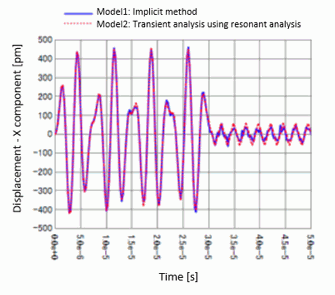
The voltage is constant at 0 [V] after 30 [us] and the change in displacement response is observed.
Results (Comparison between Models 2 and 3)
Compare between models 2 and 3.
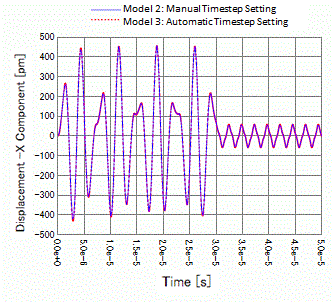
The results of Model 3, with automatic timestep setting, match well with those of Model 2.