Home / Modeling / Drawing Process / How to Create Primitives / Wire Bodies / Common Tangent Lines of 2 Circles
Common Tangent Lines of 2 Circles
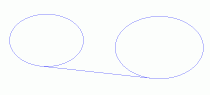
Create common tangent lines(wire bodies) between circles or arcs.
Procedure
|
-
On the [Model] tab, go to  and click ▼ at the side of [Wire Body] and click ▼ at the side of [Wire Body]  . .
Click [Common Tangent Lines of Circles]  on the submenu. on the submenu.
-
Click the existing circle or arc on the .
|
|
-
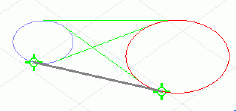
Move the mouse pointer to the other circle or arc that are on the same plane.
Common tangent lines near the mouse pointer will be highlighted.
-
Common tangent lines are created by clicking the mouse while they are highlighted.
|
|
|
-
Right click to exit.
|
|


