Home / Modeling / Drawing Process / How to Modify Objects / Move/Rotate / Cruise
Cruise
Slide the selected bodies on the surface of other body or the drawing plane.
Procedure
-
On the [Model] tab, go to

and click Select Body at  . .
|
|
-
On the [Model] tab, go to
,
and click ▼ at the side of [Move/Rotate]  . Select [Cruise] . Select [Cruise] on the submenu. on the submenu.
(Alternatively, right click the mouse. On the appearing menu, select [Move/Rotate]-[Cruise])
|
|
-
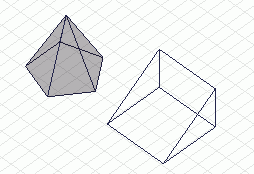
Select the bodies to cruise.
|
|
-
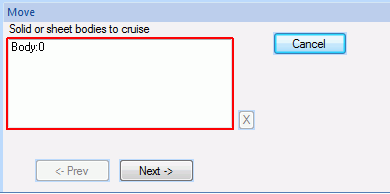
Click  in the parameter input dialog box. in the parameter input dialog box.
|
|
|
-
Designate the reference point (original). and click .
(Alternatively, click and set it on the surface of bodies to cruise on the .)
-
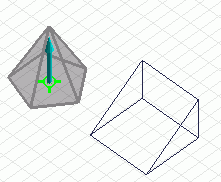
The reference point (original) is required to be on the surface of bodies to cruise.
Rest the mouse pointer over a body to cruise. A point on the surface will be selected automatically.
|
|
|
-
Designate the reference point (destination). and click .
(Alternatively, click and set it either on the surface of non-cruising bodies or the drawing plane on the .)
-
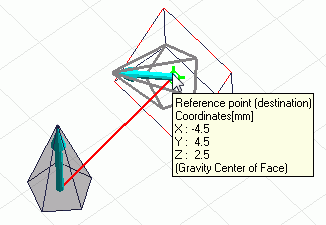
The reference point (original) is required to be either on the surface of non-cruising bodies or on the drawing plane.
Rest the mouse pointer either over a non-cruising body or on the drawing plane. A point on the surface or the drawing plane will be selected automatically.
|
|
|
-
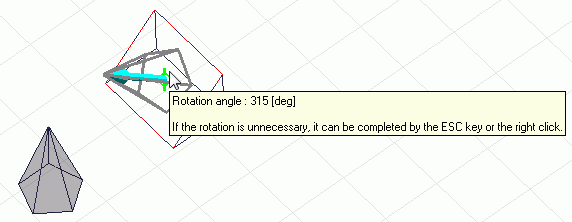
Set the rotation angle., and click  . .
(Alternatively click and set the reference point of rotation and the rotation angle on the modeling window.)
-
The unit of angle is [ ° ]
|
|