


|
Home / Calculation Speed Setting (Matrix Solver) / Direct Method Setting
Direct Method Setting
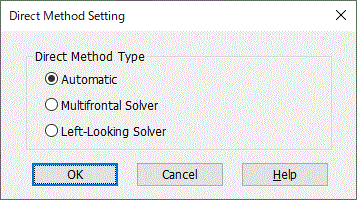
|
Setting Item |
Notes |
|
Direct Method Type |
Automatic If Accelerator is not enabled, Multifrontal solver will run by default. Multifrontal G2 solver is available in an optional package.
If Accelerator is enabled, Select the direct method solver that can perform faster calculations and run it. If there is sufficient memory capacity available, the LeftLooking solver will be selected to run; otherwise, the Multifrontal solver will be selected to run. If parallel discrete sweep is applied for the resonant or harmonic analysis, this Multifrontal solver will run.
Multifrontal Solver This direct method solver is utilized by default.
Left-Looking Solver This direct method solver is utilized in high-performance PCs such as workstations with multiple cores per CPU for faster calculations. If disc access is required in an analysis, this solver may take longer time for calculation than Multifrontal solver. If parallel discrete sweep is applied for the resonant or harmonic analysis, this solver may take longer time than Multifrontal solver. Left-Looking solver is available in an optional package. When Multifrontal solver is not allowed in this analysis, Left-Looking solver will be applied with single computer core.
If the following analysis or boundary conditions are included, the Left-Looking solver will be automatically applied. -Tetrahedral-Free/Sweep Mesh -Bond boundary -Rigid face/Rigid body -Remote Displacement -Remote Load |