|
Home / How to Set Analysis Condition / List of Analysis Condition Tabs / Solver Tab
Solver Tab
The solvers are specified on this tab.
It is in the [Analysis Condition Setting] dialog box. See also [How to Set Analysis Condition].
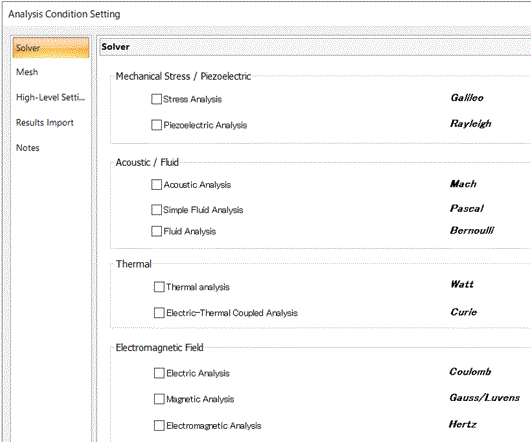
The analysis condition tabs are dependent on the context.
Select corresponding solvers for multiphysics analysis.
See [Multiphysics Analysis by Femtet] for possible combinations.
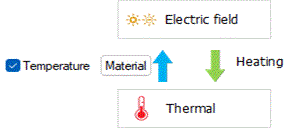
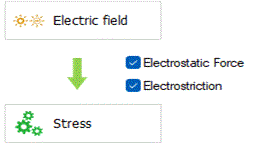
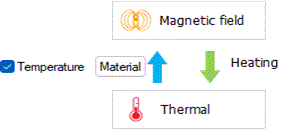
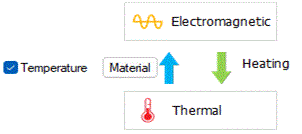
When multiple solvers are selected, a diagram showing the connections for coupled analysis features is displayed (see below).
The physical quantities exchanged between solvers and their directions are shown.
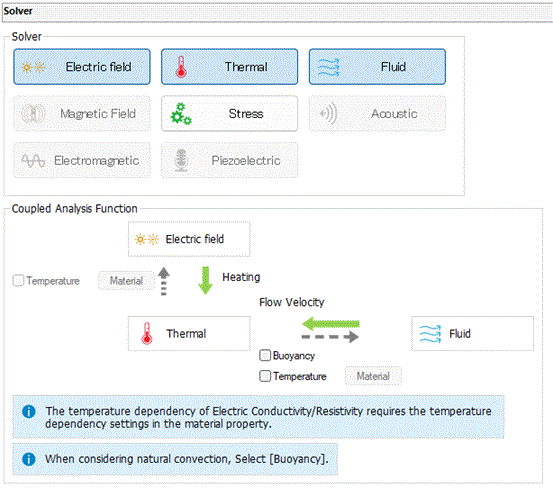
For some combinations of solvers, settings using the checkboxes in the diagram are required.
Required settings are shown in the Table below.
|
Combination of Solvers |
Setting Items |
|
Electric / Thermal
|
[Temperature] Check Box
Temperature dependence of conductivity/resistivity can be enabled or disabled. When selected, two-way coupling analysis is performed. If temperature dependent conductivity/resistivity data is not specified in the material properties,
[Material] Setting
Materials for which Temperature Dependency is considered can be checked with the [Material]. Temperature dependence can be enabled or disabled for each item individually. |
|
Electric / Stress
|
[Electrostatic Force] Check Box
Considering electrostatic force can be enabled or disabled.
[Electrostriction] Check Box
Considering electrostriction can be enabled or disabled.
At least one checkbox must be enabled. |
|
Magnetic / Thermal
|
[Temperature] Check Box
Temperature dependence of Permeability or conductivity can be enabled or disabled. When selected, two-way coupling analysis is performed. If temperature dependent Permeability or conductivity data is not specified in the material properties,
[Material] Setting
Materials for which Temperature Dependency is considered can be checked with the [Material]. Temperature dependence can be enabled or disabled for each item individually. |
|
Electromagnetic / Thermal
|
[Temperature] Check Box
Temperature dependence of Permittivity can be enabled or disabled. When selected, two-way coupling analysis is performed. If temperature dependent Permittivity data is not specified in the material properties,
[Material] Setting
Materials for which Temperature Dependency is considered can be checked with the [Material]. Temperature dependence can be enabled or disabled for each item individually. |
|
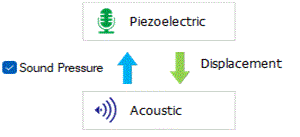
Piezoelectric / Acoustic
|
[Sound Pressure] Check Box
Considering Sound pressure applied by sound waves to solid materials can be enabled or disabled. When selected, fully-coupled analysis is performed. |
|
Thermal / Fluid
|
[Buoyancy] Check Box
Considering Buoyancy caused by the temperature difference can be enabled or disabled. Considering natural convection is enabled. When selected, two-way coupling analysis is performed.
[Temperature] Check Box
Temperature dependence of fluid material can be enabled or disabled. When selected, two-way coupling analysis is performed. If temperature dependent fluid data is not specified in the material properties,
[Material] Setting
Materials for which Temperature Dependency is considered can be checked with the [Material]. Temperature dependence can be enabled or disabled for each item individually.
|