


|
Home / How to Set Analysis Condition / List of Analysis Condition Tabs / Monitoring Tab
Monitoring Tab
The setting is done on this tab for monitoring the physical quantities during the analysis.
・The monitoring physical properties are displayed in the in-progress dialog box.
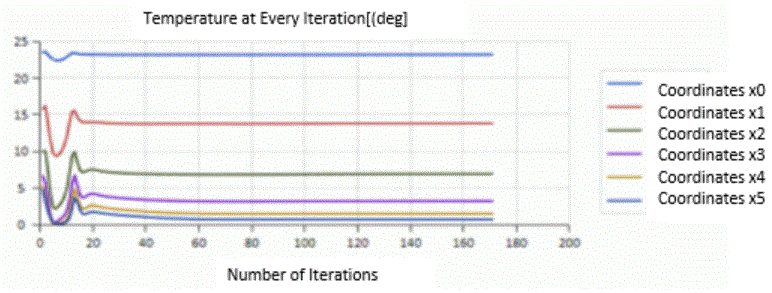
・In the fluid and fluid-thermal analyses, the monitoring values can be used as a convergence judgment value. See Detailed Setting of Fluid Analysis] for more information.
It is in the [Analysis Condition Setting] dialog box. See also [How to Set Analysis Condition].
|
Setting Item |
Notes |
|
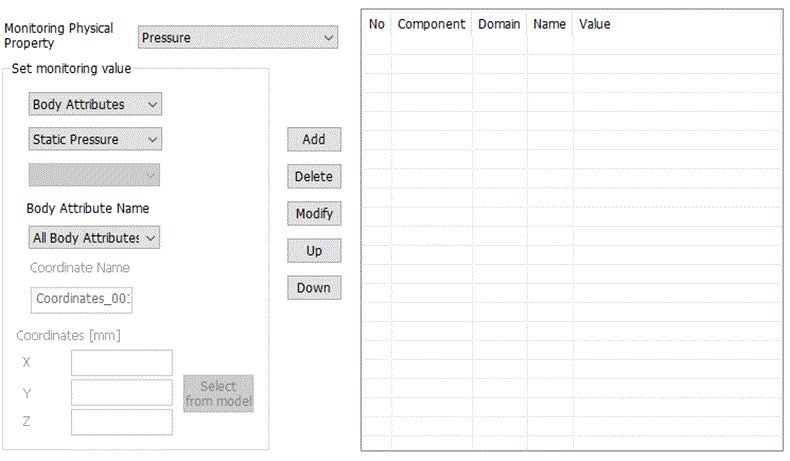
Monitoring Physical Property |
Specifies the quantity to monitor.
In the thermal analysis: ・ Temperature is selectable.
In the fluid analysis: ・ Flow Velocity ・ Pressure ・ Volumetric Flow Rate ・ Force on Wall Face ・ Torque on Wall Face (with moving wall boundary) are selectable.
In the diffusion analysis of the fluid solver: ・ Diffusion Value is selectable. |
|
Set monitoring value |
Monitoring Domain
Specifies the domain to monitor from the following: ・ Whole ・ Body Attribute ・ Boundary Condition ・ Coordinates
※ Some domains can not be selected due to monitoring physical property
Component of Monitoring Physical Property
Specifies the component of the monitoring physical property. Specifies the component if the monitoring physical property is flow velocity, pressure, or force on wall face.
Flow Velocity, Force on Wall Face ・ X Component ・ Y Component ・ Z component ・ Magnitude
Pressure ・ Static Pressure ・ Total Pressure
All the component can be selected together.
Monitoring Value
Specifies the value to monitor. Specifies the value if the monitoring physical property is temperature and if [Whole], [Body Attribute], or [Boundary Condition] is specified in the monitoring domain. Selects one from the following.
・ Maximum Value ・ Minimum Value ・ Average Value
Body Attribute Name/Boundary Condition Name
Sets the body attribute name if the monitoring domain is [Body attribute]. A list of the body attributes used in the analysis model will show up. All the body attributes can be selected together.
Sets the boundary condition name if the monitoring domain is [Boundary condition]. A list of the boundary conditions used in the analysis model will show up. All the boundary conditions can be selected together.
Coordinate Name
Specifies the coordinate name if the monitoring domain is [Coordinates].
Coordinates
Specifies the coordinates (x, y, z) if the monitoring domain is [Coordinates]. Alternatively, clicks the [Select from model] button to possibly obtain the coordinates.
|
|
Add |
Adds the conditions entered in [Set Monitoring Value]. |
|
Delete |
Deletes the conditions selected in the list. |
|
Modify |
Replaces the existing conditions selected in the list with those that are set in the [Set monitoring value]. |
|
Up |
Changes the listing order of the conditions. |
|
Down |
Changes the listing order of the conditions. |