


|
Home / Show Results / Graphics Setup / Vector
Vector
|
Setting Items |
Notes |
|
Minimum/Maximum Values |
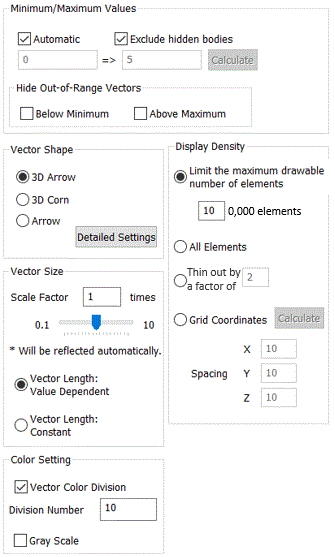
Automatic calculates the minimum and maximum values for the color scale automatically. This setting remains valid for the display of other data types. For manual setting, deselect Automatic and enter the minimum and maximum values in the boxes. Calculate button calculates the values automatically. Exclude hidden bodies calculates the values based on the bodies currently shown. At "Hide out-of-range vectors" setting, Below minimum hides the vectors below the minimum value. At "Hide out-of-range vectors" setting, Above maximum hides the vectors above the maximum value. This function is useful to display the limited number of vectors. |
|
Vector Shape and Vector Size |
Select 3D Arrow to display vectors in a shape of 3D arrow. Select 3D Corn to display vectors in a shape of 3D corn. Select Arrow to display vectors in lines. If Detailed Setting is clicked, the [Detailed Setting of Vector Shape] dialog box will show up. |
|
Vector Size |
Scale Factor specifies the length of vectors. If Vector Length: Value Dependent is selected, the length of the displayed vector will be in proportion to the magnitude of the data. If Vector Length: Constant is selected, the length of the displayed vector will be constant regardless of the magnitude of the data. |
|
Color Setting |
Vector Color Division shows vectors with the number of colors specified in [Number of Divisions]. Gray Scale shows in monochrome. Select it for the black and white printing. |
|
Display Density |
Limit the maximum drawable number of elements to 100,000 for the high-speed mode reduces the processing time. If the number of elements is less than 100,000, this selection is effectively the same [All Elements]. All Elements draws vectors for all elements on each gravity center. Grids draws vectors with a spacing specified in X/Y/Z spacing. Calculate button sets the grids automatically. Each spacing will be one tenth of the dimensions of the model. Select Thin out to reduce the number of vectors by the entered factor. |