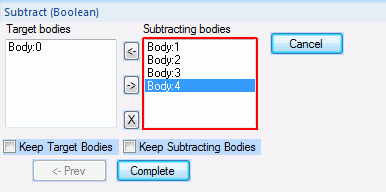
select all the objects and list the bodies to be subtracted on " Target Bodies" and the subtracting bodies on "Subtracting Bodies" in the dialog. After the subtract, all the target bodies will be left with the portion of subtracting bodies removed.
<How to List> To move bodies across the lists of "Target Bodies" and "Subtracting Bodies", select them and click or . Rest the mouse pointer on a body on the lists. It will be highlighted. The 1st body selected will be listed on the [Target Body] by default. By clicking , the selected body will be removed from the selection list.

 or
or  .
. , the selected body will be removed from the selection list.
