


|
Home / Modeling / The Basic of Modeling / Overlapping Bodies
Overlapping Bodies
If bodies overlap each other, the overlaps are removed according to the priority before running
the mesher and the solver. This processing is called automatic boolean.
If a body is contained inside another body, the body inside is removed first.
If two bodies partially overlap (called intersection), the automatic boolean is applied in the following
-
If the intersecting bodies bear the same names for body attribute and material property respectively, the one with smaller body key number is given priority.
-
If one is insulator and the other is conductor (such as conductor, perfect conductor, and semiconductor), the conductor is given priority.
If conductors are intersecting each other, the one with lower conductivity is given priority assuming they are isotropic.
If the conductivity is the same, the one with smaller body key number is given priority.
-
The body with smaller volume is given priority.
When intersection occurred, a message is shown in the log. (The bodies given priority are shown as well)
Overlapping that is not intersection (wholly contained)
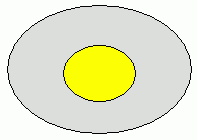
As shown in the figure below, if a body is contained in another body, that is not an intersection. (The log message will not be shown either.)
The automatic boolean is applied giving priority to the body inside.
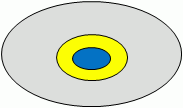
As long as one is fully contained within the other, the multiple number of overlapping is acceptable.
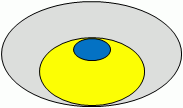
It is allowed that the contained body touch the surface of the other body.
-
The figure above is 2D, but it is applicable for 3D as well.
Overlapping that is intersection (partial overlapping)
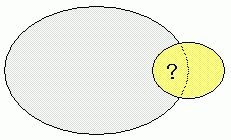
If the bodies are partially overlapped as shown below, boolean operation is applied according to the priority.
|
|
|
|

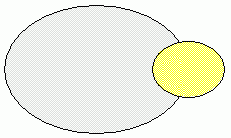
When Mesher G1 is in use
When Mesher G1 is used, the priority #1 and #2 are only applicable.
If the intersecting bodies are not applicable to the priority #1 or #2, errors will occur.
The errors might be avoided by using the automatic intersection removal function.
For the automatic removal of the intersection in Mesher G1, see [Tolerance Setting] of [Mesher G1 Setting]