


|
Home / How to Set Analysis Condition / List of Analysis Condition Tabs / Fluid Analysis Tab
Fluid Analysis Tab
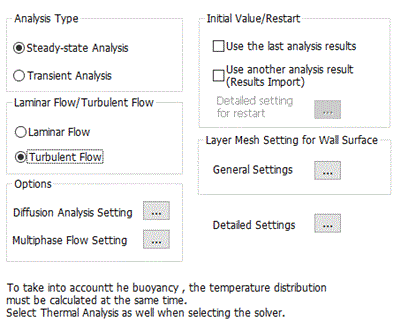
Analysis conditions for the fluid analysis are set on this tab. The solver is Bernoulli.
It is in the [Analysis Condition Setting] dialog box. See also [How to Set Analysis Condition].
|
Setting Item |
Notes |
|
Analysis Type |
Steady-State Analysis There is no time dependency.
Transient Analysis Transient states are analyzed.
|
Options
|
Options |
Notes |
|
Laminar Flow/Turbulent Flow |
Executes calculation assuming the flows are either laminar or turbulent.
|
|
Initial Value/Restart |
If Use another analysis results (Results Import) is selected, an analysis model that was already analyzed or the results file is used as the initial values for the calculation. The analysis model or the results file is specified on the [Results Import] tab.
Click the [Detailed Setting for Restart]
If Calculate quasi-steady state is selected, the analysis with finite timesteps is applied when restarting.
If Hand over the time is selected, the time of the previous analysis results or another analysis results is handed over. If the results of the previous analysis were up to 10 s for example, this option allows the analysis to continue without removing the results up to 10 s of the previous analysis. If the analysis type of fluid is steady-state or if transient analysis is applied for the thermal or diffusion analysis, all the previous results are removed and the analysis starts at 0 s.
|
|
Layer Mesh Setting for Wall Surface |
Click this button |
|
Diffusion Analysis Setting |
Sets the diffusion analysis. |
|
Multiphase Flow Setting |
Sets the multiphase flow. |
|
Detailed Setting |
Click this button
|
|
Notes |
Be sure that if you want to take into account the buoyancy ,
select [Thermal Analysis] on the [Solver] tab, and select [Take into account buoyancy] on the [Fluid-Thermal Analysis] tab. |

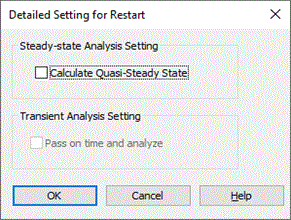
 Different analysis conditions from the previous analysis can be applied as well.
The Relating Tabs
The relating tabs are [High-Level Setting] tab and [Transient Analysis] tab.
How to Modify Analysis Conditions
To modify the analysis conditions,
on the [Model] tab,
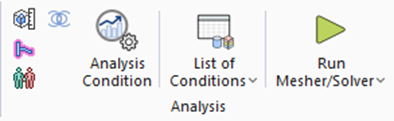
click [Analysis Condition]  . The dialog box will appear.