|
Home / Show Results / Result Field / User-Defined Field
User-Defined Field
The field based on the user-defined equation can be displayed by contour diagram.
-
Only scalar values are subject for the calculation.
On the [Results] tab,

press [Show result (other)] and click [User-Defined Field]
  on the submenu. The dialog box will appear.
Enter the equation and press the OK button. The contour diagram will show up.

|
Item |
Notes |
|
Equation |
Shown in the box. The operators and the functions listed in "Numerical Entry" can be used in the equation.
|
|
|
Inserts the specified fields in the equation. The equations representing the fields, the modes, the components are inserted automatically. See "List of Equations for the User-Defined Field" for the detail.
|
|
File Name |
Shows the result file name. The file path is shown if another file is used.
If the current result file is used, the file path is not shown in the equation. If another result file is used, the file path is indicated in the equation.
|
|
|
Opens the result file to add. The file path will be shown in the File Name.
|
|
Solver |
Specifies the solver.
|
|
Mode |
Specifies the mode. For the 0-th mode, the mode equation will not be shown in the Equation box.
|
|
Field |
Specifies the field.
|
|
Component |
Specifies the component
|
|
Phase |
Specifies the phase. If the phase is 0 deg, the phase equation will not be shown in the Equation box. The phase is entered in 5-deg interval in the entry box. Once inserted in the equation, any number can be edited in the equation. For example, the value in PHASE[25] can be changed to any other value.
|
|
Field Name (Mandatory) |
Specifies the name of the user-defined field. The field name is a mandatory.
|
|
|
Alternatively, the user-defined field is removed through the right click menu while its contour is on display.
|
|
Unit (not mandatory) |
Specifies the unit for the user-defined field. This is not a mandatory item.
|



 deletes a selected user-defined field.
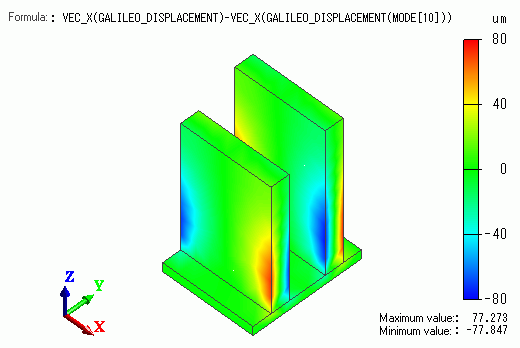
Display Example
The equation of the user-defined field is shown at the top.