


|
ホーム / モデリング / CGaudi / 関数 / CreateBondingWire2
CreateBondingWire2関数
定義
CreateBondingWire2 (PntS As CGaudiPoint, VecS As CGaudiVector, dHeightS As Double, PntE As CGaudiPoint, VecE As CGaudiVector,dHeightE As Double, dHorzRatio As Double, dDiameter As Double, dSides As Double, bFillet As Boolean) As CGaudiBody戻り値
成功した場合は新規に作成されたBodyが返ります。失敗した場合は、Nothingが返ります。
引数
| PntS | ボンディングワイヤの始点 | |
| VecS | 始点からの引き伸ばし方向 | |
| dHeightS | 始点からの引き伸ばし距離 | |
| PntE | ボンディングワイヤの終点 | |
| VecE | 終点からの引き伸ばし方向 | |
| dHeightE | 終点からの引き伸ばし距離 | |
| dHorzRatio | 水平部比率(始点終点間距離における水平部分の比率。0.0~1.0の間の値を取る。) | |
| dDiameter | ボンディングワイヤ断面の直径 | |
| dSides | ボンディングワイヤ断面の角数 | |
| bFillet | ボンディングワイヤの形状を丸み付けするかどうか |
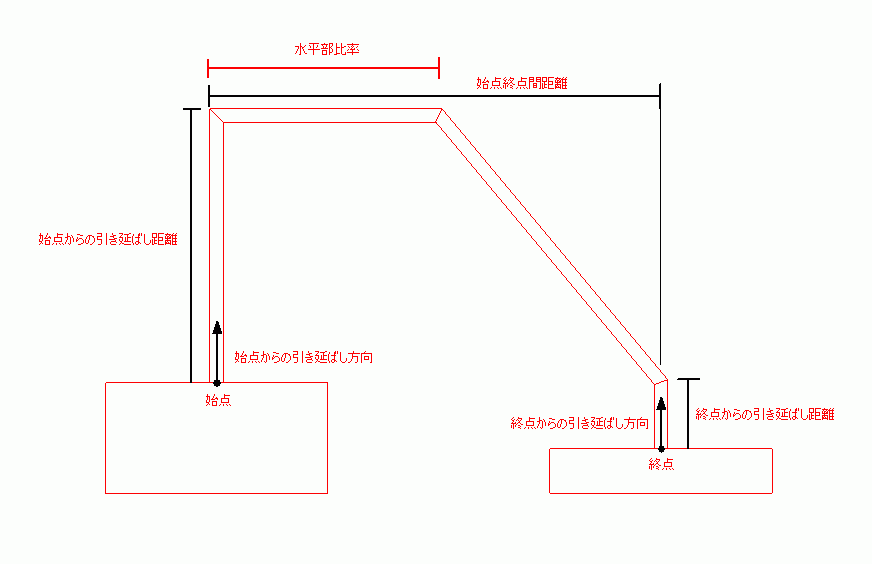
解説
指定された引数よりボンディングワイヤを作成します。dDiameterの値が0の場合は、太さのないワイヤボディとなります。
dSidesの値が0~2の場合は、ボンディングワイヤ断面が円となります。
bFilletがTrueの場合は、ボンディングワイヤの始点、終点を除く各頂点が丸み付けされます。
実行例
Dim Femtet As New CFemtetDim Gaudi As CGaudi
'新規プロジェクト作成
If Femtet.OpenNewProject() = False Then
Femtet.ShowLastError
End If
Dim Body() As CGaudiBody
Gaudi.RedrawMode = False
'------- CreateBondingWire -------
ReDim Preserve Body(0) As CGaudiBody
Dim Point0 As New CGaudiPoint
Dim Point1 As New CGaudiPoint
Dim Vector0 As New CGaudiVector
Dim Vector1 As New CGaudiVector
Point0.SetCoord -4.5, -3#, 0#
Point1.SetCoord 4#, 10#, 0#
Vector0.SetCoord 0#, 0#, 1#
Vector1.SetCoord 0#, 0#, 1#
Set Body(0) = Gaudi.CreateBondingWire2(Point0, Vector0, 7.6, Point1, Vector1, 1.4, 0.5, 1#, 6#, True)'------- モデルを再描画します -------
Gaudi.Redraw