


|
ホーム / モデリング / CGaudi / 関数 / MultiIntersect2
MultiIntersect2関数
定義
MultiIntersect2(Target() As CGaudiBody, Tool( ) As CGaudiBody, newBody( ) As CGaudiBody, RemainOrg As Long) As Boolean [Python]
MultiIntersect2_py(CGaudiBody[] Target, CGaudiBody[] Tool, int RemainOrg)
戻り値
| True | 成功 | |
| False | 失敗 |
[Python]
| [0] | True:成功、False:失敗 | |
|
[1][0~作成されたBody数-1] |
共通部分のBody(CGaudiBody)配列 |
引数
| Target | 共通部分を作成するための基準のBody(CGaudiBody)配列 | |
| Tool | 共通部分を作成するためのBody(CGaudiBody)配列 | |
| newBody | 共通部分のBody(CGaudiBody)配列 | |
| RemainOrg | 元形状を残すかどうか [0:全部残す、1:全部削除、2:Targetのみ残す、3:Toolのみ残す] |
[Python]
| Target | 共通部分を作成するための基準のBody(CGaudiBody)配列 | |
| Tool | 共通部分を作成するためのBody(CGaudiBody)配列 | |
| RemainOrg | 元形状を残すかどうか [0:全部残す、1:全部削除、2:Targetのみ残す、3:Toolのみ残す] |
解説
Boolean-Intersect(積ブーリアン)の多対多版です。Target(複数)それぞれとTool(複数)の共通部分が抽出されます。
実行例
Dim Femtet As New CFemtet
Dim Gaudi As CGaudi
Dim targetBody() As CGaudiBody
Dim toolBody() As CGaudiBody
Dim newBody() As CGaudiBody
'新規プロジェクト作成
If Femtet.OpenNewProject() = False Then
Femtet.ShowLastError
End If
'Femtet.Gaudiを変数Gaudiに代入して使いやすくする
Set Gaudi = Femtet.Gaudi
'------- CreateCircleFace -------
ReDim Preserve targetBody(0)
Dim Point0 As New CGaudiPoint
Point0.SetCoord 0, 0, 0
Set targetBody(0) = Gaudi.CreateCircleFace(Point0, 0.5)
'------- CreateCircleFace -------
ReDim Preserve targetBody(1)
Dim Point1 As New CGaudiPoint
Point1.SetCoord 1, 0, 0
Set targetBody(1) = Gaudi.CreateCircleFace(Point1, 0.5)
'------- CreateCircleFace -------
ReDim Preserve targetBody(2)
Dim Point2 As New CGaudiPoint
Point2.SetCoord 2, 0, 0
Set targetBody(2) = Gaudi.CreateCircleFace(Point2, 0.5)
'------- CreateRect -------
ReDim Preserve toolBody(0)
Dim Point3 As New CGaudiPoint
Point3.SetCoord 0, 0, 0
Set toolBody(0) = Gaudi.CreateRect(Point3, 1, 1)
'------- CreateRect -------
ReDim Preserve toolBody(1)
Dim Point4 As New CGaudiPoint
Point4.SetCoord 1, 0, 0
Set toolBody(1) = Gaudi.CreateRect(Point4, 1, 1)
If Gaudi.MultiIntersect2(targetBody, toolBody, newBody, 1) = False Then
Femtet.ShowLastError
End If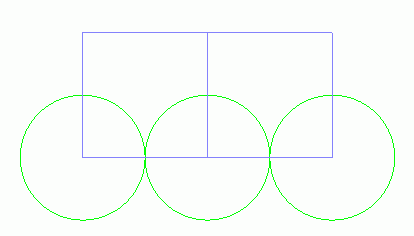
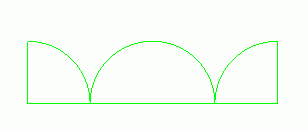
この場合は緑色がTarget、紫色がToolです。