


|
ホーム / モデリング / CGaudiBody / 関数 / DivideFace
DivideFace関数
定義
DivideFace (tools() As CGaudiBody, bDelTool As Boolean) As Boolean [Python]
DivideFace_py(CGaudiBody[] tools, bool bDelTool)
戻り値
| True | 成功 | |
| False | 失敗 |
[Python]
| True | 成功 | |
| False | 失敗 |
引数
| tools | 刻印する形状配列 | |
| bDelTool | 実行後にtoolsで指定したボディを自動的に削除するかどうか |
[Python]
| tools | 刻印する形状(CGaudiBody)配列 | |
| bDelTool | 実行後にtoolsで指定したボディを自動的に削除するかどうか |
解説
toolsで指定した形状(複数可)で面を刻みます。また、bDelToolにTrueを指定すると、実行成功後に自動的にtoolsを削除します。
toolsにはシートボディまたはソリッドボディのみ指定でき、それ以外のタイプのボディを指定した場合はエラーとしてFalseが返ります。
実行例
Dim Femtet As New CFemtetDim Gaudi As CGaudi
Dim BodyTarget As CGaudiBody
Dim BodyTool(0) As CGaudiBody
Dim Point As New CGaudiPoint
'新規プロジェクト作成
If Femtet.OpenNewProject() = False Then
Femtet.ShowLastError
End If
'Femtet.Gaudiを変数Gaudiに代入して使いやすくする
Set Gaudi = Femtet.Gaudi
Point.X =0
Point.Y =0
Point.Z =0
Set BodyTarget =Gaudi.CreateBox(Point,3,4,5)
Set BodyTool(0) =Gaudi.CreateRect(Point,1.5,2)
BodyTarget.DivideFace BodyTool, True
' これでX-Y平面上の面が2つに分割されました
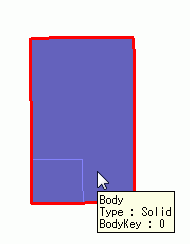 |
→ | 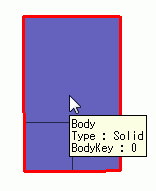 |