|
ホーム / モデリング / CGaudiBody / 関数 / ExpandBody
ExpandBody関数
定義
ExpandBody(P As CGaudiPoint, ScaleWidth As Double, ScaleDepth As Double, ScaleHeight As Double) As Boolean戻り値
| True | 成功 | |
| False | 失敗 |
引数
| P | 拡大縮小の基準点 | |
| ScaleWidth | 幅方向の倍率(0以外の値) | |
| ScaleDepth | 奥行き方向の倍率(0以外の値) | |
| ScaleHeight | 高さ方向の倍率(0以外の値) |
解説
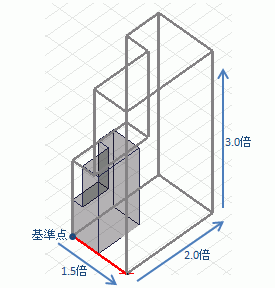
基準点を中心として、Bodyを各方向に指定した倍率分、拡大縮小します。実行例
Dim Femtet As New CFemtetDim Gaudi As CGaudi
'新規プロジェクト作成
If Femtet.OpenNewProject() = False Then
Femtet.ShowLastError
End If
'Femtet.Gaudiを変数Gaudiに代入して使いやすくする
Set Gaudi = Femtet.Gaudi
'------- SetPlane -------
Dim Plane1 As new CGaudiPlane
Plane1.Location.SetCoord 0.0, 0.0, 0.0
Plane1.MainDirection.SetCoord 0.0, 0.0, 1.0
Plane1.RefDirection.SetCoord 1.0, 0.0, 0.0
Gaudi.SetPlane Plane1
'------- CreateBox -------
Dim Point0 As new CGaudiPoint
Point0.SetCoord 0, 0, 0
Gaudi.CreateBox Point0, 10, 10, 10
'------- CreateBox -------
Dim Point1 As new CGaudiPoint
Point1.SetCoord 0.0, 0.0, 10.0
Gaudi.CreateBox Point1, 5, 5, -2
'------- Subtract -------
Dim Body0 As CGaudiBody
Dim Body1(0) As CGaudiBody
Dim Body2() As CGaudiBody
Set Body0=Gaudi.Body(0)
Set Body1(0)=Gaudi.Body(1)
Body0.Subtract Body1, Body2, True
'------- ExpandBody -------
Dim Body3 As CGaudiBody
Dim Point2 As new CGaudiPoint
Set Body3=Gaudi.Body(2)
Point2.SetCoord 0.0, 0.0, 0.0
If Body3.ExpandBody(Point2, 1.5, 2.0, 3.0) = False Then
Femtet.ShowLastError
End If