|
ホーム / モデリング / CGaudiBody / 関数 / RingCopy
RingCopy関数
定義
RingCopy ( P As CGaudiPoint, Axis As , IntervalAngle As Double, CopyNum As Long, newBody( ) As CGaudiBody)As Boolean [Python]
RingCopy_py(CGaudiPoint P, CGaudiVector axis, double IntervalAngle, int CopyNum)
戻り値
| True | 成功 | |
| False | 失敗 |
[Python]
| [0] | True:成功、False:失敗 | |
| [1][0~作成されたボディ数-1] | コピーにより作成されたCGaudiBody(配列) |
引数
| P | 回転軸上の点 | |
| Axis | 回転軸の方向ベクトル | |
| IntervalAngle | 角度[deg] | |
| CopyNum | コピー個数 | |
| newBody( ) | コピーにより作成されたCGaudiBody(配列) |
[Python]
| P | 回転軸上の点(CGaudiPoint) | |
| Axis | 回転軸の方向ベクトル(CGaudiVector) | |
| IntervalAngle | 角度[deg] | |
| CopyNum | コピー個数 |
解説
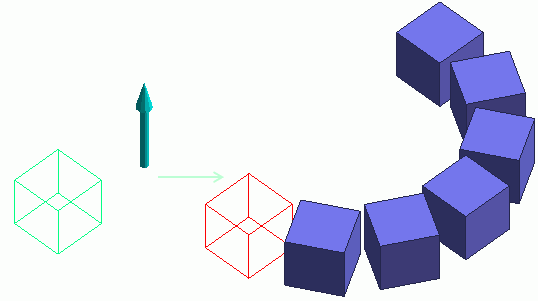
CGaudiBodyのコピーを環状に作成します。属性は継承します。指定した回転軸まわりに、設定した角度間隔ごとに指定個数分コピーを作成していきます。
実行例
回転軸上の点を(1.0,7.0,0.0)、方向ベクトルを(0.0,0.0,1.0)、角度を30度、コピー数を6として、立方体を複製します。Dim Femtet As New CFemtet
Dim Gaudi As CGaudi
'新規プロジェクト作成
If Femtet.OpenNewProject() = False Then
Femtet.ShowLastError
End If
Dim Body() As CGaudiBody
Gaudi.RedrawMode = False
'------- CreateBox -------
ReDim Preserve Body(0) As CGaudiBody
Dim Point0 As New CGaudiPoint
Point0.SetCoord 0#, 0#, 0#
Set Body(0) = Gaudi.CreateBox(Point0, 2#, 2#, 2#)
'------- RingCopy -------
Dim Point1 As New CGaudiPoint
Dim Vector0 As New CGaudiVector
ReDim Preserve Body(1) As CGaudiBody
ReDim Preserve Body(2) As CGaudiBody
ReDim Preserve Body(3) As CGaudiBody
ReDim Preserve Body(4) As CGaudiBody
ReDim Preserve Body(5) As CGaudiBody
ReDim Preserve Body(6) As CGaudiBody
Dim BodyArray0() As CGaudiBody
Point1.SetCoord 1#, 7#, 0#
Vector0.SetCoord 0#, 0#, 2#
Body(0).RingCopy Point1, Vector0, 30#, 6#, BodyArray0
Set Body(1) = BodyArray0(0)
Set Body(2) = BodyArray0(1)
Set Body(3) = BodyArray0(2)
Set Body(4) = BodyArray0(3)
Set Body(5) = BodyArray0(4)
Set Body(6) = BodyArray0(5)
'------- モデルを再描画 -------
Gaudi.Redraw