


|
ホーム / モデリング / CGaudi / 関数 / MultiSubtract2
MultiSubtract2関数
定義
MultiSubtract2(Target() As CGaudiBody, Tool( ) As CGaudiBody, newBody( ) As CGaudiBody, RemainOrg As Long) As Boolean [Python]
MultiSubtract2_py(CGaudiBody[] Target, CGaudiBody[] Tool, int RemainOrg)
戻り値
| True | 成功 | |
| False | 失敗 |
[Python]
| [0] | True:成功、False:失敗 | |
| [1][[0~切り取られたBody数-1] | 切り取られたBody(CGaudiBody)配列 |
引数
| Target | 切り取る対象のBody(CGaudiBody)配列 | |
| Tool | 切り取るBody(CGaudiBody)配列 | |
| newBody | 切り取られたBody(CGaudiBody)配列 | |
| RemainOrg | 元形状を残すかどうか [0:全部残す、1:全部削除、2:Targetのみ残す、3:Toolのみ残す] |
[Python]
| Target | 切り取る対象のBody(CGaudiBody)配列 | |
| Tool | 切り取るBody(CGaudiBody)配列 | |
| RemainOrg | 元形状を残すかどうか [0:全部残す、1:全部削除、2:Targetのみ残す、3:Toolのみ残す] |
解説
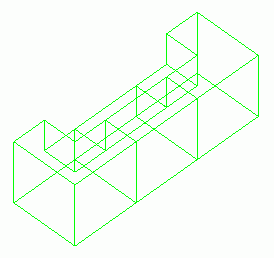
Boolean-Subtractの多対多版です。Target(複数)それぞれからTool(複数)が引かれる形になります。
実行例
Dim Femtet As New CFemtet
Dim Gaudi As CGaudi
Dim targetBody() As CGaudiBody
Dim toolBody() As CGaudiBody
Dim newBody() As CGaudiBody
'新規プロジェクト作成
If Femtet.OpenNewProject() = False Then
Femtet.ShowLastError
End If
'Femtet.Gaudiを変数Gaudiに代入して使いやすくする
Set Gaudi = Femtet.Gaudi
'------- CreateBox -------
ReDim Preserve targetBody(0)
Dim Point0 As New CGaudiPoint
Point0.SetCoord 0, 0, 0
Set targetBody(0) = Gaudi.CreateBox(Point0, 1, 1, 1)
'------- CreateBox -------
ReDim Preserve targetBody(1)
Dim Point1 As New CGaudiPoint
Point1.SetCoord 0, 1, 0
Set targetBody(1) = Gaudi.CreateBox(Point1, 1, 1, 1)
'------- CreateBox -------
ReDim Preserve targetBody(2)
Dim Point2 As New CGaudiPoint
Point2.SetCoord 0, 2, 0
Set targetBody(2) = Gaudi.CreateBox(Point2, 1, 1, 1)
'------- CreateBox -------
ReDim Preserve toolBody(0)
Dim Point3 As New CGaudiPoint
Point3.SetCoord -0.5, 0.5, 0.5
Set toolBody(0) = Gaudi.CreateBox(Point3, 1, 1, 1)
'------- CreateBox -------
ReDim Preserve toolBody(1)
Dim Point4 As New CGaudiPoint
Point4.SetCoord -0.5, 1.5, 0.5
Set toolBody(1) = Gaudi.CreateBox(Point4, 1, 1, 1)
If Gaudi.MultiSubtract2(targetBody, toolBody, newBody, 1) = False Then
Femtet.ShowLastError
End If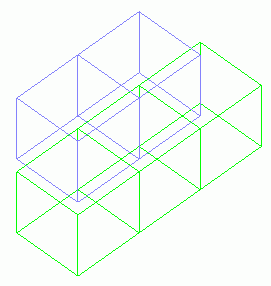 |
 |
|
| この場合は緑色がTarget、紫色がToolです。 | ||